CMSI 185: Welcome to Week 04
This Week's Class Agenda
REMEMBER: Your first test is next Thursday!!
Structural Elements
To put this week into context, so far we have discovered programming tools, some basic language constructs, the idea of algorithms and how to think "algorithmically", and the data types that are part of the JavaScript language. There are still a few more fundamental things to uncover before any really sophisticated programming work can be done:
- Homework questions
- Fix the "guessing game"
- Show the document/window properties
- Web page tree diagram
- Data types and how they are used to create objects
- Arrays, Strings, JavaScript prototypes
- Data structures such as stacks and queues which are constructed from JavaScript primitives
- Using data structures to implement algorithms
- LOTS AND LOTS more examples to stress these "final" fundamentals
- A few more "war stories" from the trenches of software engineering
Data Types for Fun and Profit
Arguably one of the most interesting things about the JavaScript language is the fact that it is "Object-Oriented". This means that as a programmer you can implement things using special user-defined data structures which are referred to as objects. An object is an accumulation of things that are related to each other in some way, as well as behaviors that can operate on those things. If you think of a real-world item, like a person, there are certain things that all people have: two arms, two legs, a head, two eyes, two ears, ten fingers, ten toes, a name, an address, a phone number, and so on. You can create a Person object to have some or all of these. There are also certain things that people can do: blink, make a phone call, enroll in a class, eat, drink, etc. In the parlance of Object-Oriented Programming (OOP), the parts of a person are called properties and the properties can have values. The behaviors are called functions and these are able to be used for operating on the properties in some way. Properties can be defined as other objects, which allows you to make up things that have properties which may have their own properties in turn.
It is easy to define properties in JavaScript; all that is needed is to declare a variable and list the properties (and initial values if desired) inside curly braces as shown below:
      var person = {
         name: "Virginia Woolfe",
         address: "1234 Anystreet Ave.",
         city: "Lost Angles",
         state: "Kahlifornia",
         zip: "98765",
         phone: "135-246-3579"
      };
Once you have defined the object, you can access the properties using the "dot" operator:
      alert( person.name );            // alerts "Homey D. Clown"
      alert( person.zip );             // alerts "98765"
      alert( person["phone"] );        // you can also use square brackets instead of the dot
You can also add new properties to an object by simply using the dot operator to put a new one in "on the fly":
      person.cell = "321-654-7890"
      alert( person.cell );            // alerts just what you'd expect
It is tempting to consider objects to be the things themselves; however, in JavaScript you must learn to think in terms of "references" to the objects, which is the way things work in memory. A perfect example of this is on page 76 of your textbook, reproduced here for easy reference:
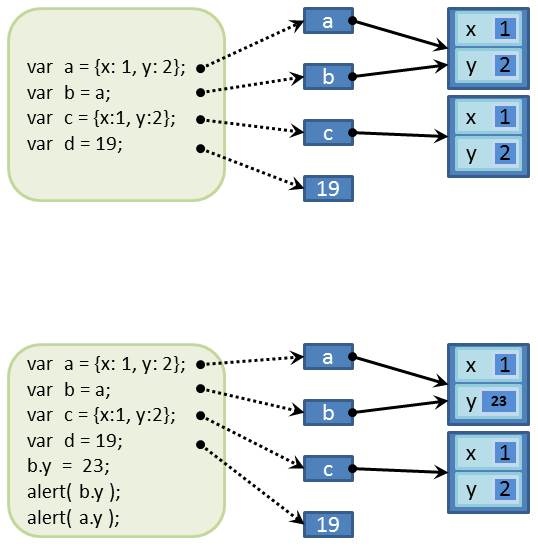
The top diagram shows three objects and a simple variable. Object a is defined to have properties
x and y, both of which are initialized. Object b is defined as a copy of
object a; note that they both point to the same object in memory. Object c is another definition of
the same type of object as objects a and b, but it is a different object in the
computer memory. Finally, variable d is NOT an object, but a simple variable. Note how
the variable declarations point to a small box which then points to a big box. This is the idea of
a "reference" and is key to the concept of Object-Oriented programming.
The bottom portion of the diagram shows how to address the properties of an object using the dot
notation, and also shows what happens when we change something. We'll learn more about the intimate
details of this situation later in the semester when we talk about scope, but for now, you
can see that since a and b point to the same object, changing something in
either one will change it for both.
Arrays and Strings
One simple way to begin to understand objects is the concept of an array. The name is
applied to a collection of things which can be accessed by an "index". For example, if I
have a list of sixteen items, like shirts, that can be represented by a shirts array.
In this case, the different shirts can be accessed individually by using the square brackets and the
index of each shirt in the array. If I want the first shirt, I would use shirts[0].
(Arrays in JavaScript, like many languages, start at zero rather than one.)
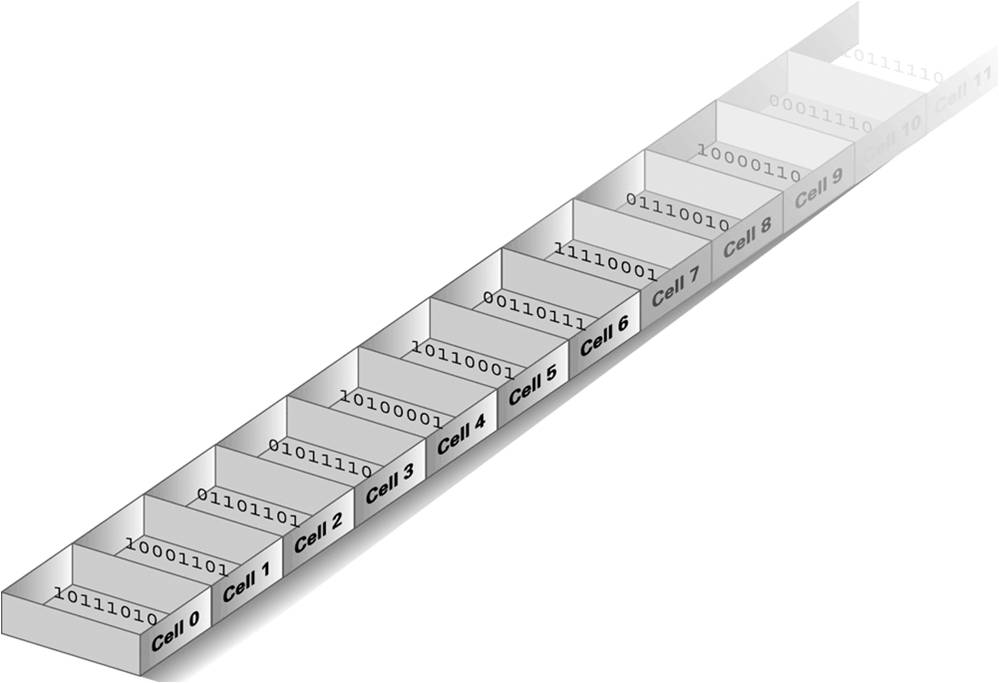
In this simple example, the array is composed of all the same thing, namely shirts. However, with JavaScript, we can have whatever we want in each array element, which is called a heterogeneous array. We can even have other arrays and even objects as array elements. Arrays can have more than one "dimension", which is the name given to the associated blocks of values of the array. An easy way to visualize an array is as a spreadsheet. A one-dimensional array is simply a list of values, like a row in a spreadsheet. Of course, the array in memory is usually drawn in a similar way, but most often is shown as a column rather than a row, just to make things confusing; this is because the traditional way to show computer memory is as a column. Don't let it fool you though — these are all just abstractions, which are no more than different ways to help the human brain visualize things conceptually. Here's a picture of what I mean (borrowed from the textbook I use in my CMSI 182 class):
Two-dimensional arrays include both the rows and the columns of the spreadsheet. Each direction is
considered a dimension. With two-dimensional arrays, we really need to consider how the data is
stored in memory. Obviously, with a linear memory space, we can only fill up the memory in a line.
However, we can simulate two dimensions by knowing how long each dimension is, and using
that knowledge to allocate enough space for each part. For example, lets say we have a 5x12 array
of values in which each cell contains the amount of money you made each day. The five values in row
one would represent the first week, the values in the second row would represent the second week,
and so on. (BTW, this is called "row major order", because the rows get filled first.)
In computer memory, we could allocate 60 slots of RAM, with every five slots corresponding to a row
of our table. Each row has an "offset" from the beginning of the memory space which correspondes to
the length of the rows. To access any row, we simply calculate the offset by multiplying the count
of cells in a row by the number of the row we're looking for. In our example, if we wanted to see
the salary for the third day of the fourth week, we would multiply 5 * (4 - 1) to get to the row
location in memory, then add the offset (3 - 1) to get to the memory slot in that row, and finally
add that to the starting memory address. If our memory block starts at address 23, then the whole
equation becomes
address = 23 + (5 * (4 - 1)) + (3 - 1),
which we can generalize to
address = start + (cells-per-row * (row - 1)) + (column - 1)
In a way, this confuses the issue; all good computer scientists start counting at zero, but this equation is based on starting the counts of the rows and columns at one. This inconsistency can cause you to get the wrong value unless you remember that fact. Perhaps a more consistent way to specify would be to start the counts at zero, and NOT subtract one from the row and column numbers that are being considered. However, this doesn't always make good sense for a given problem statement — for our example, using the new count we'd be looking for the second day of the third week, but that means that Monday is day zero of the week instead of day one…
Then, of course, there are three-dimensional arrays, four-dimensional arrays, etc. Anything above three dimensions is very hard for humans to visualize, since we are three-dimensional beings. You can, however, write code that has more dimensions; FORTRAN allows seven!
QUICK QUIZ: Why do we subtract one from each of these calculations?
JavaScript arrays are actually objects, of course, and there are several special properties already defined for you to use. There is a length property, as well as several functions like split, slice, and join. You can also push and pop, making an array a great candidate for use as a stack or queue which we'll talk about later. You should read section 3.7 of your textbook for more details.
What if you have defined an array of five things and you suddenly find you have six of them? For JavaScript this is not a problem. You can "grow" the array by simply assigning the value of the sixth item. In fact, if you later decided you needed 20 elements for this array, but you only know what the 20th one is (elements seven through nineteen are unknown) it's not a problem. You can assign the value you know to the element you want and JavaScript will happily expand the array to the size you need. We'll do some of this in class to see how it works.
There are, of course, quite a few built-in functions in the array object which JavaScript provides us to make things simple (and standard). We'll experiment with these in class and on your homework as well.
OBTW, the string type can be thought of as a special type of array. When we create a
string, we are really creating a one-dimensional array (a row) of characters. Each element
of the string (or array) can be accessed in much the same way as the array elements can be accessed
individually just like with any array, using the square brackets. The string object in JavaScript
has a length property, as well as split(), slice(), substring(), toLowerCase(), and toUpperCase()
functions. You can call the function concat() to stick two strings together as well. Check out the
complete string descriptions at the W3C
Javascript String page for more information. We'll do some examples of both arrays and strings
in class, and you should experiment on your own as well!
Also, don't forget that you can use a string literal as a string object — for example, we can
say "Hello, world, I am a string!".substring(0, 5) to produce the string "Hello".
JavaScript Prototypes
As part of the idea of Object-Oriented programming, we also get the idea of the relationships
between objects. For example, suppose we have three kinds of car, a Chevrolet, a Toyota, and a
Porsche. They are all cars, and by that measure they all have certain things in common. Obviously,
a Chevy is not a Boxster, but they both have four wheels, steering wheels, doors, an engine, and so
on. It might be convenient to create a car class which contains all these standard
items as properties, then be able to create subclasses of the car class, to
which we can then assign the specific details that make a Chevy different from a Porsche. Here's a
UML object diagram to show this concept with the instantiations of the car object:
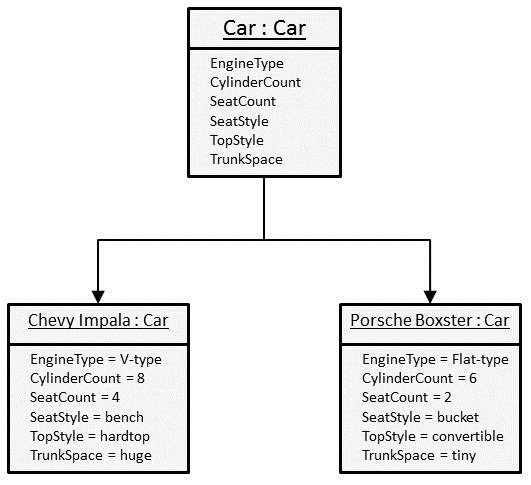
The thrust of this argument is that you can define a general class, then you can define specific versions of that class so that you can make lots of them whenever you want, and can call them whatever you need to and assign values to their properties as you require them. This is the whole reason for JavaScript's "prototypes". Every JavaScript objec has a special property that is built into it, which is a hidden link to another object called its prototype. When you define any object, JavaScript automatically makes the link to a prototype for you. Then when you make an instance of that object, the prototype can be used so you don't have to re-type all the code for each of the instances. For example:
      var protoPerson = { name: "a", address: "b", phone: 2132132132 };
      var john = Object.create( protoPerson );
      john.name = "John Bonham";
      john.address = "1234 Anystreet Ave.";
      var marsha = Object.create( protoPerson );
      marsha.phone = 3103987654;
      alert( "name: " + john.name + " and phone: " + john.phone );
      alert( "name: " + marsha.name + " and phone: " + marsha.phone );
Notice something cool about this code. First, we can create as many people as we want that all have the same properties to start with. This is an example of the Object-Oriented concept called "inheritance", meaning that once we've defined a prototype, we can use it to make as many of that kind of thing as we need. Second, we have "initialized" the values IN THE PROTOTYPE so that they have default values when we make a new instantiation (a fancy name for what we are doing when we make a new thing). This is shown by the fact that we never assigned any value to John's phone number, but one existed anyhow (also that Marsha's name is "a"). Third, we can use the "Object.create()" function to make new copies of the protoPerson from the prototype.
Remember there are some other cool things to know about prototypes, such as prototypes can have other prototypes, and the prototypes of an object can be searched to find references to things that are missing in an object, making a "prototype chain". This concept is explained best in your textbook, with descriptions and graphics appearing on pages 76 — 79.
Stacks, Queues, and Other Friends
Now we are ready to start implementing some of the basic data structures. YAY! REAL PROGRAMMING! AT LAST!
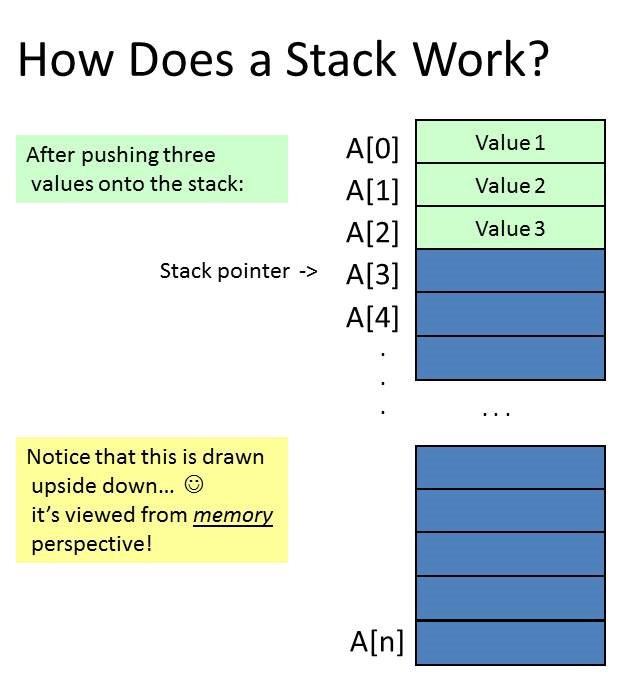
There are two basic data structures which are used quite a bit in Computer Science, the stack, and the queue (pronounced like the letter Q). Both of these are exactly what they sound like. A stack is just like a stack of trays in a cafeteria: you can only take things off the top, or put things onto the top, of the stack. This structure is referred to as "Last In First Out" or LIFO. In keeping with this idea, we say we PUSH something onto the stack when we add an item, and we POP something off the stack when we remove an item. Stack operations are done one item at a time. Here is a diagram to illustrate:
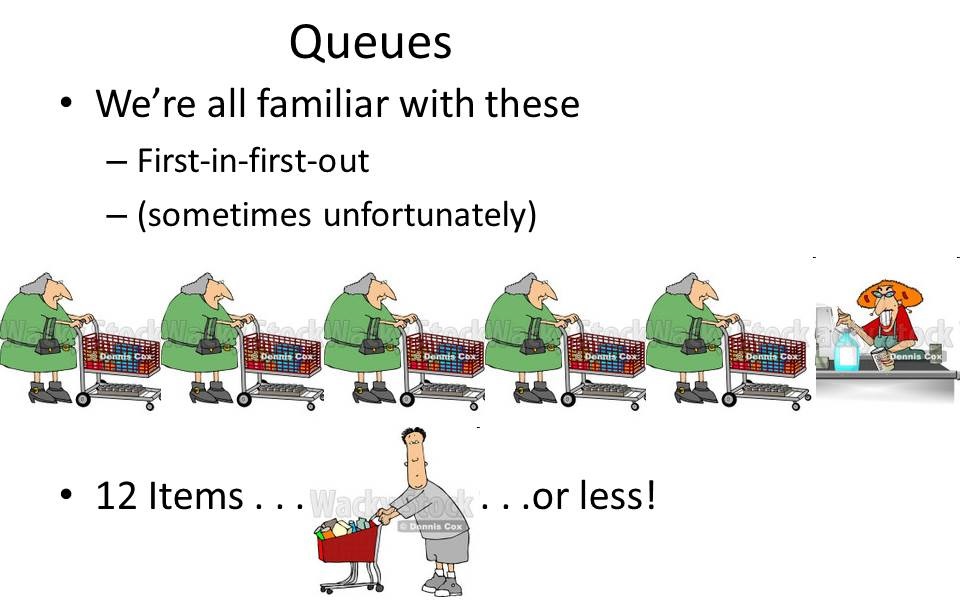
The second basic structure, the queue, is similar to the checkout line at the supermarket. In fact, such lines in England are called queues. The idea is that the first thing in is the first thing that can come out; "First In First Out" or FIFO is the term for this ordering. And here's the ubiquitous drawing for a queue:
Question: can you think of a built-in JavaScript object which would be a good candidate for implementing a stack? How about a queue?
Question: What data structure would you use to write a program which will keep a list of documents to be printed? Why did you choose that data structure?
Question: What data structure would you use to write a program that keeps track of runners finishing a race? Why did you choose that data structure?
There are many other kinds of data structures, such as lists (both singly- and doubly-linked), trees, tries, graphs, and several more. We'll stick to the basics in this class. OBTW, an array is also a data structure, which means that you can use data structures to implement data structures, which is kind of confusing. You have to decide sometimes whether the array IS the data structure, or whether the array IMPLEMENTS the data structure.
Algorithm Implementation
Back to the heart of Computer Science!
One of the main ideas of the discipline is the implementation of a set of steps to solve a problem. Any set of steps which is ordered, which has a definite end (it halts), and which solves a particular problem of some kind can be referred to as an algorithm. We discussed some examples already, such as the addition algorithm which appeared on the week two page.
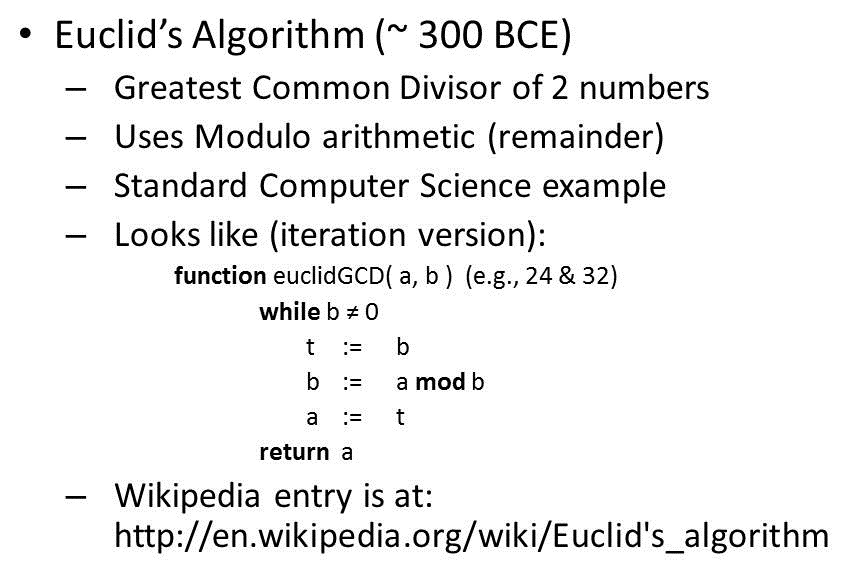
Another famous algorithm which is used frequently is Euclid's algorithm for finding the greatest common factor of two numbers. Let's take a look at that one.
Another cool algorithm is a method of swapping two numbers without using a third (temporary) storage variable. This concept has applications when performing sorting operations, as we'll see in a few weeks. It's easy to perform such a swap using a third variable, but not so obvious if you must do the swap "in place", meaning you can only use the two variables themselves. Here's how to do it with the extra temporary variable:
      var a = 23;
      var b = 19;
      alert( "a = " + a + " and b = " + b );
      // now let's swap them....
      var c = a;
      var a = b;
      var b = c;
      alert( "a = " + a + " and b = " + b );
Gee, that was easy! Now here's how to do it without the extra variable c using simple
addition and subtraction operations rather than assignment:
      var a = 23;
      var b = 19;
      alert( "a = " + a + " and b = " + b );
      // now let's swap them....
      var a = b - a;
      var b = b - a;
      var a = a + b;
      alert( "a = " + a + " and b = " + b );
You can see, it's exactly the same number of steps, but there are only two variables! Interestingly, even though this only works with numbers, it doesn't matter whether the numbers are positive or negative, and because computers represent letters in a numeric form you can sort letters this way, too. You will have to do some special handling to explicitly convert the character to its integer representation, to keep the results from being "NaN", and then back again at the end, but the idea still works.
Another common algorithm is the Russian Peasant Multiplication procedure. This algorithm has its roots in the idea of "double and halve and throw away". The check is to see if the halved result is even or odd; if even, you throw out the doubled result, if odd you add it to the total. Here's an example presented in pseudocode form:
      1. Assign larger number to A
      2. Assign smaller number to B
      3. Total := 0
      4. If B is odd then
         a. Total := Total + A
      5. A := A * 2
      6. B := B / 2 throwing out any remainder
      7. Repeat steps 4 through 6 until value of B is 1
      8. Return Total
Of course, there is a WikiPedia page for this: click here!
Test/Quiz One is Coming...
There are lots and LOTS more interesting algorithms which we will discuss over the coming weeks. For now, though, remember your first test/quiz is next Thursday. It will cover everything that we've discussed up to now including books, on-line assignments, videos, homework #1, and what we've done in the classroom. You will NOT be able to work in pairs on this, so make sure you understand everything individually. The test/quiz will be closed book, closed note, closed neighbor, and it is on Thursday so if you have any questions, you can ask them on Tuesday or make an appointment to see me beforehand to answer questions.