CMSI 486: Welcome to Week 02
This Week's Class Agenda
- Introduction
- What's a database?
- Do we have to have one?
- Beginnings and theory
- Relational Algebra
- Application of the concepts
- Examples and practice
OK — Let's start at the beginning!…
Databases are everywhere. Do you have an email account? Have you ever ordered anything from Amazon? Are you a student? Do you have a driver's license? Are you on Facebook? Twitter? Tinder? Do you have a smart phone? A router in your house or dorm room?
Give me some other examples....
If you have a large amount of data that you would like to manage effectively, a database tool can be of significant value. Yes, there are pratfalls, but by-and-large, the benefits outweigh the detriments; otherwise, why would they be so ubiquitous?
Here's an interesting exercise: can anyone think of an application that does NOT use some kind of database?
What's the difference between data
, information
, and knowledge
?
- Data: stored representations of objects and/or events that have meaning and importance to a user or to her environment. This includes both structured and unstructured data, as well as multimedia.
- Information: data that has a specific meaning based on the context of its application.
- Knowledge: information that can be used to provide a practical or theoretical understanding of a topic, involving cognitive perception, reasoning, and communication.
Metadata is data about the data
. It is a set of data which describes the
properties or characteristics of a set of data somehow. This is the kind of thing you see at the
top of a web-page [<meta> tags
].
Just what IS a database
, anywho!?
Fundamentally, a database
is just a set of data that is being managed somehow. It doesn't
really NEED to be IN A DATABASE to *BE* a database. Any time you have a set of data that is being
used for some purpose, and is kept around for later use, and has its information retrieved and/or
added to periodically – that's a database. A recipe box, like your grandma used to have with
all her instructions for baking your favorite cookies and pies, for example, is a kind of database.
So is a spreadsheet. So is a table in a word processor.
While these are quite useful for small-scale applications, they don't scale
very well. What
would happen if your Grandma's recipe box had over a million cards in it? How long do you think it
would it take her to find that specific recipe for your favorite lemon meringue pie?
A LONG TIME AGO, IN A GALAXY FAR, FAR AWAY… a database
was usually
just short for a relational database
. Those days are over, you don't have to sell your body
to the night, Roxanne.
A real
database is a system that not only handles adding, deleting, querying, and updating of
the data, but also provides the services and operations to handle concurrency, distribution, security,
transaction processing, error handling, recovery, backing up/replication, logging, and many other
functions, so that the user or administrator can focus on the so-called business logic
that
is the reason for the database in the first place.
Do we have to have a database engine
to have a database?
The answer should be obvious by now…
Sort of like Eddy Izzard's comedy routine:
Guns don't kill people, people do
– similarly, databases aren't necessarily required
for data management, but they sure can help…
There are several primary benefits for use of a database. First, there is the idea of being able
to have the data stick around for as long as it's needed – an idea known as persistence.
This means that the data will be there, pretty much always. Second, there is the idea of having the
data available to users so that they can make use of the data when they need it – this is a
concept known as accessiblitiy. Properly vetted/qualified users can get access to the data
they need, and because it is persistent, it is there for them to use. Third, there is the concept
of having the data be the right data
at all times, no matter what – this is known as
data integrity. Finally, of course, there is the fundamental idea that nobody can just waltz
in and muck around with the data; this is the idea of data security.
These four concepts: persistence, accessibility, integrity, and security, are the main four reasons that database management systems [or DBMS's] have become so fundamental to operations of all types and sizes, and are so ubiquitous in today's world.
What is the basic theory that it started with?
What are advantages and disadvantages?
It all started with the idea of having a bunch of data that was stored on a computer, and was then
managed
by a program or application, so that users could add, store, retrieve, and change the
data easily. We'll see more about the developmental history later, but for now, the first real usable
databases were on mainframe computers like the IBM 360, and were used almost exclusively by Corporate America
– meaning banks and insurance companies mostly. The engines were not very efficient by today's
standards, but they were the current technology of that time [1970's]. The biggest players at that time
were IBM and
Oracle.
Next, along came personal computers, and when those took hold, the idea of a personal database
management system also got scaled down to fit. Several different vendors produced smaller-scale
database systems, which built on the ideas of IBM/Oracle Relational Database Management Systems
[RDBMS].
The basic idea of an RDBMS is that there are entities
that have attributes
, and that
these entities relate
to each other in both general and specific ways. We'll learn more
about these ideas later. And BTW, this relational theory is what
Edgar F. Codd is known for. Significant
early work was also done by Raymond Boyce.
The two of them collaborated to develop the Boyce-Codd Normal Form
, which we'll find out more
about later in the semester.
The database approach to data storage, retrieval, and maintenance, focuses on integration and the sharing of data throughout an organization, while protecting that data from access by users that are outside the organization. Nine of the advantanges of using a DBMS are:
- Program-Data independence, such that the data can change and evolve without the application program that uses the data having to change [within limits, of course].
- Data consistency, meaning there is a single copy of the data so that every user gets the same data across the organization.
- Data sharing, that allows all the users in the organization that need access to either general or specific pieces of data can get to it in a timely fashion.
- Improved productivity, which zooms in not only on access to the data but also on development of applications to access the data in specific ways and/or for specific purposes.
- Standardization, such that all people in the organization treat the data and the DBMS in a consistent way, from naming conventions to terminology to communication between departments.
- Better data quality, which allows an organization to rely on the data being accurate, up-to-date, and dependable.
- Better responsiveness, for which you can think again of your grandmother's recipe box.
- Reduced maintenance, improving the cost of ownership of maintaining huge troves of data.
- Finally, better decision support for management, to make timely, strategic business decisions to keep their companies competitive, cost-effective, and flexible.
Of course, there are also some drawbacks:
- Specialization of personnel, which need to be hired and engaged to administer the DBMS
- Installation and maintenance costs that are incurred with any system
- Backup/recovery operations and plans so that if something happens the system can be restored
- Managing organizational conflicts which may arise if different departments need to access the data differently and political or inter-departmental struggles arise
Relational Algebra, For The Win (FTW)
So, now we know why, [or why not…] so it's time to check out the how.
To implement a relational database, using a schema
, and to be able to add/change/delete data
from that database, we need some sort of query language. The standard language for this is known as
Structured Query Language
[usually] or SQL
for short. However, this is based on some
underlying theoretical principles and operations, which collectively are known as Relational
Algebra and its counterpart, the Relational Calculus.
Most of this topic is based on set theory, because the data can be treated as a set of items
that are manipulated. You may remember, way back in CMSI 186, the idea of tuples
? That is
what we are dealing with here. If you think of any entry in a database as a tuple, you can't go
wrong! And BTW, the number of items in a tuple is called arity
, just so you have YET another
term to remember.
So, for example, here are a couple of trivial typical relations, which are often called tables:
| EATS | |
|---|---|
| Name | Food |
| Anna | Pizza |
| Billy | Spinach |
| Charlene | Pizza |
| LIKES | |
|---|---|
| Name | Food |
| Anna | Pizza |
| Billy | Spinach |
| Charlene | Pizza |
| Charlene | Steak |
Let's see how we can manipulate this data using set theory and relational algebra.
Relational Algebra Fundamentals
There are six main or fundamental operations that are part of the relational Algebra. They are as follows:
- select: select tuples with given conditions
- project: select out columns that satisfy some more specific condiiton
- rename: rename a relation, which might be the result of another operation
- cartesian product: combine tuples from two relations into one
- union: perform a binary union between to relations
- set difference: find tuples that are in one relation but not another
The first thing we'd want to do is select some data from one of the tables. This operation is done,
obviously, with a SELECT
operation. In this context, SELECT simply means to parse out the
specific tuples that fit a specific condition, finding the table[s] that fit rather than just the
rows of data that fit. We use the greek symbol of a lower-case sigma to indicate this operation.
When selecting we'd like to be able to narrow the focus when we want. This is where the so-called
where clause
comes into play. It allows us to match specific data in specific rows with one
or more specific conditions. There are six different complarison operators that help with this
operation: equals, not equals, less than, greater than, less-than-or-equals, and greater-than-or-equals.
The tokens used for this are the same as you'd think from mathematics or set theory. There are also
logical operators, AND, OR, and NOT available.
NOTE: there is an order of operations associated with the comparisons, which goes:
- COMPARISONS [equals, not equals, less than, greater than, less-than-or-equals, and greater-than-or-equals]
- NOT
- AND
- OR
As an example, let's select all the people named Anna from the Eats
table we saw earlier. This is
a simple expression, just to show you how things work. The select operation would be:
σ( Eats where Name = 'Anna' )
OR WE COULD USE
σname='Anna'( Eats )
This expression will return the entire row from the EATS relation that contains the name ANNA:
| RESULT-RELATION | |
|---|---|
| Anna | Pizza |
Note that the second version of the query is often preferred, since this allows you to daisy-chain
the operation that we'll be bringing up in a few minutes. ALSO, IT'S VERY IMPORTANT TO REMEMBER that the
result of any operation on any relation or set of relations IS ITSELF A RELATION! This is what gives
the relational algebra [and SQL, for that matter] its power!
The next thing we'd want is to be able to do a selection, but get rid of any duplicate rows that may
result. The operation for this is called projection
, and is indicated by the greek letter PI.
For example, let's say we wanted to find out how many distict foods are in the Likes
table.
To do this, we would use projection:
πfood( Likes )
This expression will return all the UNIQUE values in the FOOD column of the LIKES relation:
| RESULT-RELATION |
|---|
| Pizza |
| Spinach |
| Steak |
Finally, we'd want to be able to do combinations of operations on things and manipulate the resulting sets to get the data we need to use. In this case we have other operations from set theory:
- UNION: in which the result is the set of all rows that belong to one table, the other table, or both tables
- INTERSECTION: in which the result is the set of all rows that belong strictly to both tables
- DIFFERENCE: in which the result is the set of all rows that belong to one table but not to the
other, with the
one table
meaning the one of interest.
For puroposes of further illustration:
Here are some tables that define a database that we can use for practice.
| CHECKING ACCOUNT | DEPOSITOR | LOANS | |||||||
|---|---|---|---|---|---|---|---|---|---|
| BranchName | AccountNumber | AccountBalance | CustomerName | AccountNumber | BranchName | LoanNumber | Amount | ||
| Downtown | A-101 | 500 | Johnson | A-101 | Downtown | L-17 | 1000 | ||
| Mianus | A-215 | 700 | Smith | A-215 | Redwood | L-23 | 2000 | ||
| Perryridge | A-102 | 400 | Hayes | A-102 | Perryridge | L-15 | 1500 | ||
| Round Hill | A-305 | 350 | Turner | A-305 | Downtown | L-14 | 1500 | ||
| Brighton | A-201 | 900 | Johnson | A-201 | Mianus | L-93 | 500 | ||
| Redwood | A-222 | 700 | Jones | A-217 | Round Hill | L-11 | 900 | ||
| Brighton | A-217 | 750 | Lindsay | A-222 | Perryridge | L-16 | 1300 | ||
There are some interesting things to observe in this set of tables. Technically, there are things missing such that we will NEVER be able to determine things from this information given, like who owns Loan L-23 or where Ms. Smith lives, or even the location of the Brighton branch. We CAN, however, determine things like what the total account balance is for all the depositors, or what accounts Ms. Turner has, or what the total loan amounts for the Perryridge branch are.
IN CLASS EXERCISE 1: What is the relational algebra expression to determine the branch name for Checking Account number A-215? What about for loan number L-93?
IN CLASS EXERCISE 2: What is the relational algebra expression to determine the customer name of the checking account which has a $900 account balance?
IN CLASS EXERCISE 3: What is the relational algebra expression to determine the branch name of the branch at which Ms. Smith has a checking account?
IN CLASS EXERCISE 4: What other in formation would we need to answer the questions What is relational algebra
expression to determine the customer name of the person with the loan amount of $2000?
IN CLASS EXERCISE 5: What is the relational algebra expression to determine the loan numbers and loan amounts for loans in the Downtown Branch? What about those in the Perryridge Branch?
IN CLASS EXERCISE 6: What is the relational algebra expression to determine the Account Numbers for all Checking Accounts having an account balance greater than or equal to $500?
IN CLASS EXERCISE 7: What is the relational algebra expression to determine all Checking Account numbers for the
Depositor named Johnson
?
There may be more than one way to answer these; for some possible solutions, click here!
Other Operations Defined and Examined
Previously the operations Union, Intersection, and Difference were mentioned. These are straightforward to understand, just from their definitions. Here are some examples using the tables already provided:
- Union is simply the joining together of both of the relations to make a new relation,
which includes everything from both. The caveat here is that the two relations involved must be what
is called
union-compatible
, which means they must have the same set of attributes. What this means in database parlance is that the attributes in each of the two entities must all have the same names. The examples which follow should make this clear. The symbol for Union is a bigU
forUnion
[duh]:
∪ - Intersection is simply forming a new relation from the parsed out data that comprises
the overlapping portions of the two relations. Again, however, the two
relations involved must be union-compatible [which is kind of a strange way to put it for intersection,
but… well, there it is…] The symbol for Intersection is an
upside-down U
, which I guess is because intersection is sort of the reverse of Union, in a way. So it looks like this:
∩ - Difference is also just like it sounds — creating a new relation that is the set
difference of the two involved relations. In this case, it depends on which of the involved relations is
specified first, to get the desired outcome. The symbol for set difference is just an extra-long minus
sign, like
—
. So we can specify:
A — B
…and that means we want to get a resulting relation that contains everything in relationB
that is not in relationA
. Obviously, according to this definition, if we swap it around, we'll be asking for everything inA
that is not inB
.
So, what do these look like in terms of using them? What can we do with them in Relational Algebra? Hey, inquiring minds want to know…
Quick Quiz: can we do the UNION operation on the tables in the database above? Why or why not? What about INTERSECTION? What about SET DIFFERENCE? Try to answer yourself first, then click here to see the answer.
Some Other Operations, too…
There are a couple of other operations that we might want to do with our data. For example, we may want to be
able to find out who the biggest depositor is, meaning, what is the Customer Name of the person who has the
most money in her checking account?
We might also want to know the Loan Number of the Loan that has the
smallest Amount, so that we can target that person with an ad for taking out a NEW loan [smacks of Facebook,
huh?]. We may also want to COUNT the total number of rows in a result relation that fits some criteria.
All of these things are based on the general operation that is called AGGREGATION
, which
is often shown using the symbol of an upper-case G
. So, for example, if you wanted to count the number
of people that have a Checking Account in the bank, you would use the COUNT operation
in aggregation, like this:
R := GCOUNT(AccountNumber)(CheckingAccount)
We can also use the MAX
, MIN
, and AVERAGE
, and several others [these four are the most
common becauseMAX
,they are the most useful, IMHO…].
The Nuts and the Bolts…
OK, so now we know a little about the background and underlying concepts of the SQL language that
is sort of the granddaddy of it all. There are still a few details to be aware of, in which the
devil may [or may not] reside. One of these things is the idea of joins
. Another is the
concept of keys
. Finally, there is the idea of normalization
. We will get to all of
these things in the next several weeks, starting with joins from our old friend Relational Algebra.
Products
A PRODUCT is a way of pairing each tuple in a table with each tuple in another table. It's similar
to the cross-product
operation. For example, assume the following tables:
| Table A | |
| Column 1 | Column 2 |
|---|---|
| 1 | 2 |
| 3 | 4 |
| Table B | ||
| Column 1 | Column 2 | Column 3 |
|---|---|---|
| 5 | 6 | 7 |
| 8 | 9 | 10 |
| 11 | 12 | 13 |
In this case, the operation Table A X Table B
would produce:
| Table A CROSS Table B | ||||
| Column A.1 | Column A.2 | Column B.1 | Column B.2 | Column B.3 |
|---|---|---|---|---|
| 1 | 2 | 5 | 6 | 7 |
| 1 | 2 | 8 | 9 | 10 |
| 1 | 2 | 11 | 12 | 13 |
| 3 | 4 | 5 | 6 | 7 |
| 3 | 4 | 8 | 9 | 10 |
| 3 | 4 | 11 | 12 | 13 |
This result leads to the idea of JOINS
.
OMG OMG — Join Happens!!
A JOIN
is a way of implementing the set theory stuff we were looking at with
Relational Algebra. A JOIN is basically a cross-product, but with one of the fields that is common
to both relations used as the common denominator for the join. This means that there has to be some
column [attribute] in both relations that will have the same values so that the relations can be joined.
In database parlance, that means something to join on
. The symbol for a join looks
like a "squared-off infinity symbol", sort of like a bow-tie, like so:
⨝
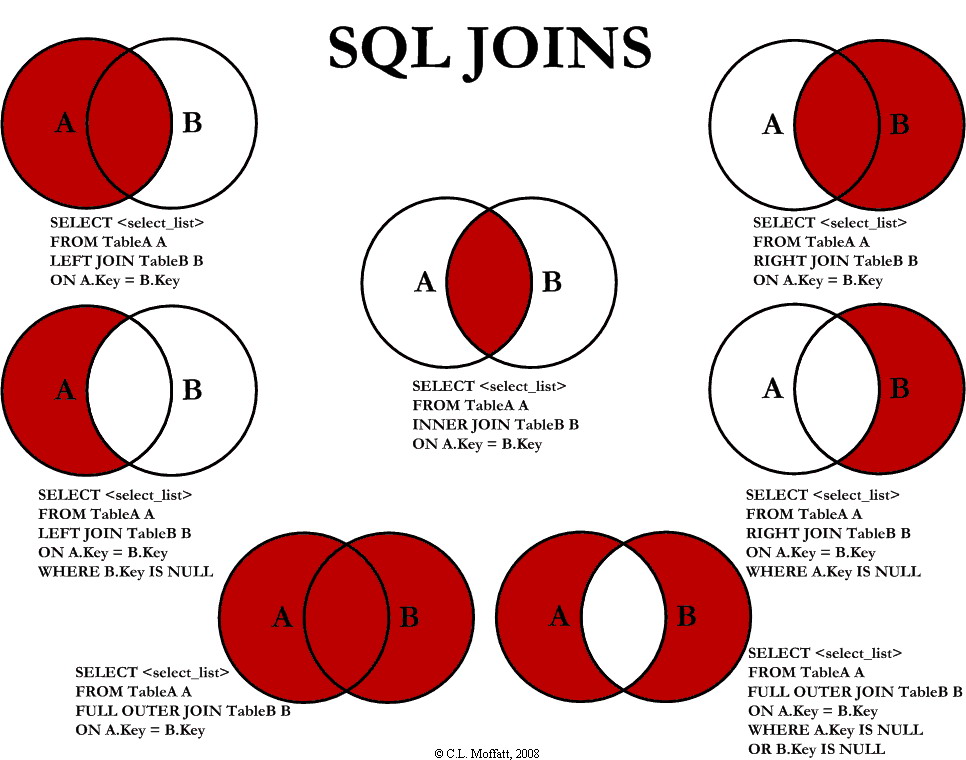
There are several different types of joins, and they can get very confusing to deal with. Most of the time, you will use just the keyword JOIN, but there are lots of other variants:
- JOIN means [usually] the LIMITED CROSS-PRODUCT of two tables
- INNER JOIN means only stuff from where both tables overlap [like an intersection]
- OUTER JOIN means basically give me everything in both tables
- LEFT JOIN means only stuff from the left side table and from the overlap of both tables
- RIGHT JOIN means only stuff from the right side table and from the overlap of both
- LEFT INNER JOIN means same as LEFT JOIN
- RIGHT INNER JOIN means sames as RIGHT JOIN
- FULL OUTER JOIN means basically give me everything in both tables
Here is a picture which might help to clarify things.
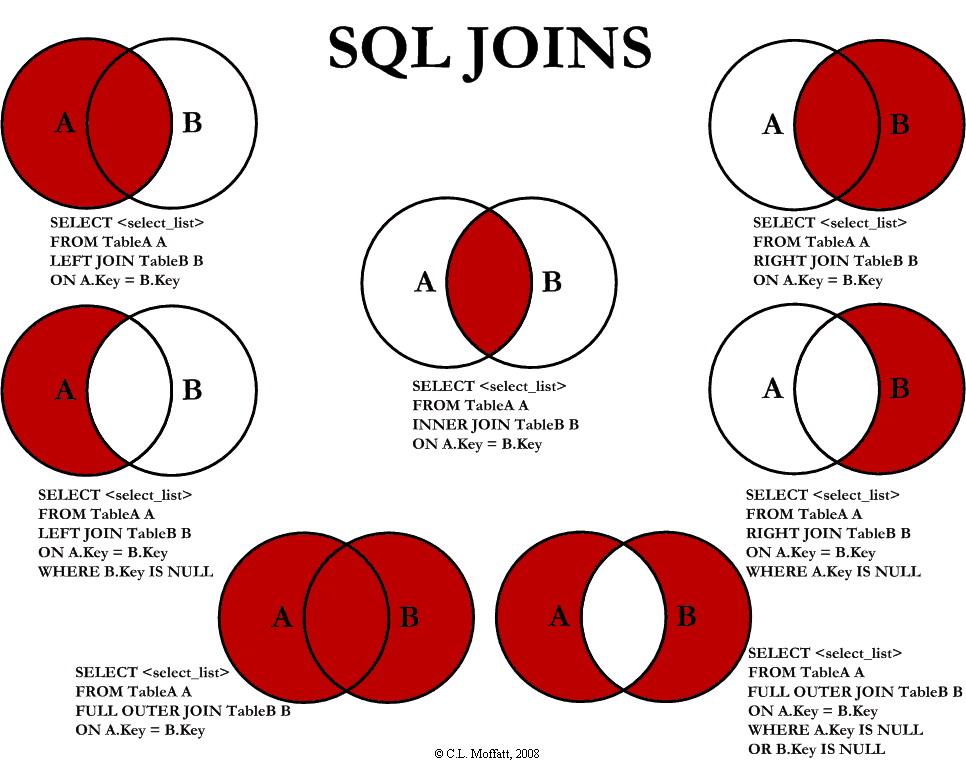
Picture from this location, through Google Images.
NOTE TO SELF: Go review the slide deck about Relational Algebra at this point for more examples.
NOTE TO SELF: Go review the Wikipedia page about Relational Algebra at this point for more examples.
Hey, Mom & Dad, can I borrow the keys?
One of the main things to remember with relational databases [and other types as well] is the idea
of keys
. While a key can be thought of as any of the columns in the table that is of interest
at the moment, it is usually the part of each row that in some way guarantees it is a unique data item
in that table or relation. There are [of course!] several variants of keys:
- Primary key: This is the column in a table that is primarily used for differentiation of the table rows.
- Candidate key: This is an column [or set of columns] in a table which can uniquely identify a row in the table. All Primary keys will be Candidate keys, but not the other way round.
- Foreign key: a key [usually a primary key] in one table which is maintained as an
attribute in another table. This is frequently seen in special tables called, confusingly,
relations
. - Composite key: a [usually] primary key which is composed of multiple attributes in a table. This is NOT usually good practice, but is sometimes necessary due to trade-offs in the database design for particular applications.
The idea of having a key is to ensure that there is something in each record [row] that will ensure a
unique identification for that row. To this end, you can pick whatever you like to be the
main key for the relation, called the primary key
. Remember, though, that computers work best
with numbers, so a numeric primary key is frequently the best choice from the attributes of any entity.
Another good thing about numbers, especially integers, is that they are infinite, so using them means
you won't run out of numbers for use in the key field of your relation. This sometimes means you need
to add an extra attribute to your relation to hold the primary key.
Let's See Things In Action…
Starting with a nice little website, of which you may have heard, called SQLfiddle
, which
is located at this link, we will define a database in it, load
in some data, and play with the SQL that relates to the Relational Algebra topics we've seen up to
this point. We'll start with the data from the week 2 page tables, then augment that and use it to
experiment with different things we've seen here as implementations of Relational Algebra, joins,
and keys.
Coming up…
We will delve more into Relational Algebra next class/next week and relate
the concepts to
the SQL language with LOTS more examples so you can see how the underlying concepts that Mr. Codd
came up with provide a direct translation to the SQL language that is so commonplace for so many
databases that are used today.