Development Plan Introduction
This web page specifies the format and content of the Software Development Plan (SDP).
This plan is intended to describe the process that will be used during the semester, leading to the production of all required documents and software for your project.
An industry standard SDP has sections about all the gory detail of the software project, including how the development team is structured, what the configuration management plan is, how the defined coding standards go, and on and on and on. For example, a CMMI standard version of the SDP has the following main sections:
The Software Development Plan deliverable of your project will be a shorter version of that CMMI standard document. Much of the detail of the example SDP has been removed, as can be seen by the outline below. However, the remaining outlined sections must provide enough detail to get most of the important points across.
Once this document has been created, it should be obvious to everyone exactly what you'll be doing and when it will happen during the project schedule. Unfortunately, things never quite work as planned; nevertheless, the intent of this document is to attempt to formulate a good plan to start with, which can be modified if needed during the course of project development.
Although this document should be concise (meaning short), there is considerable work involved in defining the organization of the schedule for the semester. So don't think that a concise document necessarily means an easy document!
Outline of the Deliverable
The document should be structured as follows (sections are explained below):
            4.1   Plan Introduction
            4.1.1 Project Deliverables
            4.2   Project Resources
            4.2.1 Hardware Resources
            4.2.2 Software Resources
            4.3   Project Organization
            4.4   Project Schedule
            4.4.1 PERT / GANTT Chart
            4.4.2 Task / Resource Table
            4.4.3 Class Schedule (optional)
Keep in mind that even though there are subsections, the main sections are expected to contain text. For example, section 4.1 should have a paragraph introducing the software and the plan used to develop it.
4.1 SDP Plan Introduction
The introductory paragraph should simply identify the project in a complete and understandable sentence. In industry documents, the introduction is something like:
This Software Development Plan provides the details of the planned development for the Gompus Dereekus Software CSCI (Embraceable Pickle document number TSW-86429-H22--07) which provides an application to notify registered users when their gompus goes into the dereekus state.
Try to mimic something of this nature in your opening sentence.
Then, in the next paragraph, include a brief recap with more detail of what the application will do, and a rationale for its development. Briefly describe all the activities which will take place as part of development. In addition, list your project's sub-task completion dates (milestones) from the master schedule, using the deliverables schedule from the table on the Course Overview page as a guideline, not as grist for the cut-and-paste mill!
4.1.1 Project Deliverables
Describe all of the items which will be delivered to the customer (i.e., the instructor), and the delivery date for each one. The information is mentioned in the deliverables schedule in the Course Overview page. This must be more detail than included in the milestones list from section 4.1. It can be a bullet list, but there must be an explanation after each bullet point.
For example, you could start with the list from the Course Overview page including each item as a bullet, but with sub-bullets for each major item to provide more detail. Or, you could write each one as a bullet followed by a paragraph of explanation. Or, you could write things in an outline format. It doesn't matter so much what form you use, as long as the information is provided.
4.2 Project Resources
Resources are elements which must be managed, but will assist in the completion of the project. In the following subsections, describe as completely as possible all of the different resources that will be used during development.
In terms of project management, the general term "resource" usually refers to the person or team which is responsible for a particular part or subsection of the project. This part could be a specific deliverable, a section of a deliverable, a class or function, or any number of other parts. There may be a few or a lot of them, based on the size of the project and what is called the "granularity" of the schedule.
4.2.1 Hardware Resources
List all hardware which is required during the project, both for the development effort, and for the actual execution (demonstration) of the project. If this is a client/server application and there will be a separate server computer to run the server-side, list the details of that machine as well as the development machine. If the project involves a database which is hosted on a different computer, include that computer's details. If the development machine and the application host are different (like in mobile app development) be sure to list all applicable computing resources which will be needed (remembering that if you will need to test things on several different devices if you are planning to have it work on them). List all the detailed specifications of the computing assets you'll be using.
4.2.2 Software Resources
List all software tools which are required during the project, such as text editors, compilers, IDEs, third party software, operating systems, and related packages. If you plan to use Eclipse, list that product and its version, along with any plug-ins you will use. If you plan to use sublime text, list it. If you plan to use a MySQL or a Node.js tool, include all the details of version, etc. Be complete!
4.3 Project Organization/Human Resources
If this were a group project, this is where you would describe the organization of the team members. In this paragraph, you would introduce the various roles to be performed by various project members and would also describe how these roles are organized along communication and control paths. This means, who is responsible for what, in a general sense.
However, since this is an individual project, there are no team roles to describe, so instead, you should describe how the project is divided into major functions, and provide a short description and a brief development plan for each. If you'd like, in the past a couple of people have written this section as if it were a team project, and have used multiple aliases as the names for the team members. Clever!
The team members could be listed along with an explanation of each team member's responsibilities. Each team member could get a separate subsection of the document. Or, there could be sub-sections for each "sub-team" of the project, and the members of each sub-team and their duties could be described under each sub-heading. Whatever floats your boat…
4.4 Schedule
Describe the process which will be used for development in a time-ordered way. This process should include all of the tasks which will occur during development. In section 4.4, just put a simple introductory sentence for the section, like "This section provides schedule information for the <your project name here> project." The full details will be broken down into the following sections, which are described below.
4.4.1 PERT Chart or GANTT Chart
Your deliverable will have one or the other of these. Read on . . .
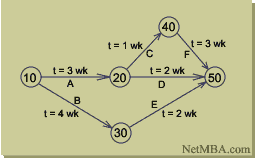
A PERT Chart is one way of describing a schedule. It looks like this:
PERT stands for "Program Evaluation and Review Technique." It is a network model that allows for completion times of project activities to be somewhat random. It was developed in the late 1950's for the U.S. Navy, to provide project management. The PERT method can help reduce both time and cost required to complete a project.
The idea behind PERT is that activities to be accomplished are called "activities", and the dates marking the milestones of project completions are called "events". These are assembled into graphs like the one in the picture. The arcs of the graph are project activities, and the nodes are the events. Before an activity can begin, all activities that are predecessors must be finished. The graphic above (from the website link in the following paragraph) is a simple example. Most PERT charts have at least several pages of graphs like this one.
In the example, the numbered nodes might be such things as:
In this case, node number 10 indicates the process, and arc "A" indicates that process will need three weeks to complete. Once it is completed, node number 20 can start. The same thing can be said about arc "B", which takes four weeks to get to node number 30. If you follow the paths between the nods and add up the weeks for each path, you will find the longest duration through the graph, which is the critical path for the project. In this case, of course, it is the path from node 10, through nodes 20 and 40, to node 50 with a total duration of seven weeks.
Here is a link to an MBA site which tells all about PERT charts; what they are, how to develop them, and what they can be useful for, as well as some of their drawbacks. Also, there is a section in chapter 3 in your textbook about PERT charts which you should at least read as an overview. Although Agile uses the "Burndown " chart, and most large corporate development projects (read "CMMI-based") use the Gantt chart, it is still helpful to know a bit about the PERT chart which is kind of the granddaddy of it all.
A GANTT Chart is another way of describing a schedule. It looks like this:

GANTT charts are named for their inventor, Henry Gantt. The chart is based on a graph using Cartesian coordinates, where the X axis is linear time and the Y axis is a listing of the tasks to be performed. Showing the schedule in this way makes it somewhat easier to visualize the duration of the subtasks in relationship to each other. Elapsed time durations for each task are shown as horizontal bars in the chart, one bar to each line (task) of the project. Milestones are shown as black diamonds. Frequently, the start point of the task is shown as a triangle, and the stop point is shown as an upside-down triangle (that's why the milestones look like diamonds; when you put the triangles on top of each other it becomes a diamond).
The GANTT chart is the basis for Microsoft Project, which is pretty much the gold standard for the scheduling task in larger corporations. You can simulate the same sort of idea using a spreadsheet if you use the cell coloring; the triangles and diamonds become implicit with the line endings in this case. There are undoubtedly other fine tools, which a google search will turn up. BTW, IHMO, Excel, and Project are the two things which Microsoft actually got right . . .
Gantt charts are also covered in a section of chapter 3 of your textbook.
Charts are a great way to show what is known as the "critical path" of a project which is the sequence of events on which the overall schedule outcome is based. There is also a new-ish thing called "critical chain" which is based on a Japanese Manufacturing methodology. Guess what — Critical Path planning is also covered in chapter 3 of your text!
Here is a link to the same MBA site that tells all about GANTT charts.
Your task for this section is:
This will show the order and relationships between tasks, and will show the general flow of the semester as well as specific deadlines (milestones). IMPORTANT SAFETY TIP! Don't forget to put all meetings, conferences, discussions, integration sessions, and other non-coding activities into the schedule. They take time and must be planned for!
Interesting side note: When a task gets behind and management starts getting worried, one of the first things that happens is they make a new GANNT chart. The new chart may go through several iterations until management is satisfied that all the tasks are broken out to a sufficiently low level. Then there will be durations assigned to the tasks. A new cycle of iterative massaging is then performed. When the results are posted, the milestones are often so close together that they can't really be called "mile"-stones any more. This is where the term "inch"-stones is derived. When a project has gotten into enough schedule trouble that the progress starts being measured in inchstones, it is a sign that extreme micro-managing is happening. This can be difficult, not only because you will begin spending a large amount of your (already precious) development time preparing and giving status reports, but also because the "new" schedules will be notoriously short, so there won't be enough time to perform your assigned tasks (even without the extra status reporting). Caution!
Another interesting side note: When a project starts to fall behind and management gets worried, one of the first things that managers want to do is "throw more people at the project", meaning assign more people because their initial assumption is that there aren't enough workers to complete the task on time. They figure that if a project is supposed to take 6 months with 1 person, it should take one month with 6 people. The problem with this is two-fold. First, the problems in the project which are making it run late may have nothing to do with the number of people. Second, assigning more people to a late project will only make it later — the new team members will have to be trained and "brought up to speed" on everything, which can only be done by the existing team members, and this activity will further distract them from their normal tasks! Go check out Fred Brooks' book The Mythical Man Month for complete details on this.
4.4.2 Task/Resource Table
The task/resource table will show the relationship between tasks and resources. In other words, for each task you will show the people, hardware and software that the task will require use of. This helps provide proper resource "loading" so that no one person (or other resource) is critically over-burdened. The object is to make sure that all team members share the load as equally as possible.
4.4.3 Class Schedule (Optional)
This section will show a schedule of all class meetings and the activities that will occur during those meetings. These activities will include all of the oral presentations and any faculty lectures. Also include any outside responsibility such as room reservations, invitations, flyers, and refreshments for the final presentations.
Table of Contents
Entries in the table of contents should be generated for the this section as they are defined above.