CMSI 401 Documentation: Software Development Plan
Why a Software Development Plan?
This page provides information about the Software Development Plan, or SDP section of the project notebook. The Software Development Plan is intended to describe the process that will be used during the semester leading to the production of all required documents and software.
Why do we need a written plan to develop software?
An industry standard SDP has sections about all the gory detail of the software project, how the development team is structured, what the configuration management plan is, how the defined coding standards go, and on and on and on. The Software Development Plan deliverable of this project should be a shorter version of that document. Much of the detail of the industry standard SDP has been removed, as can be seen by the outline below. However, the remaining outlined sections should provide enough detail to get most of the important points across.
Once this document has been created, it should be obvious to everyone involved in the project exactly what they should be doing, when they should be doing it, and by when it must be done for the project to conclude successfully. Although things never go quite as they are planned originally, the intent of this document is to provied a roadmap for the project, to insure as few things are left to chance as possible. Having a plan can answer questions such as:
- How many functions can be in a module?
- What is the over-all project schedule?
- When will the section on which my section relies for data be completed?
- Where is the configuration repository?
- Who is the "book boss"?
- Why do we have twenty-three relations in the database?
- What computing platforms will be used for development?
- Which software tools are specified for use in developing networking?
- When is integration testing supposed to be finished? How is completion determined?
- Who is responsible for building and releasing the product?
- How many releases will there be during the life of the project?
- When will the maintenance phase begin?
- How many people are working on the server facility?
- Who is responsible for maintaining the Software Requirements Specification document?
- How much schedule time, in days, is allowed for unit testing of the GUI modules?
- What is the airspeed velocity of an unladen swallow?
- OK, I just put that in to see if everyone is awake?
This document should be concise (meaning short) but not terse (meaning sketchy). However, there is considerable work involved in defining the organization of people and the schedule for the semester. So don't think that a concise document necessarily means an easy document. Don't forget that part of the plan includes writing all the documentation, setting up/planning/holding team meetings, unit testing your code, working together to integrate your modules with other team-members' code, working with each other to perform integration testing, and much more. IT IS CRITICAL TO SCHEDULE TIME FOR THESE ACTIVITIES!! If you forget to plan for them, you will not have enough time for them in your schedule, and you'll wind up spending all night in the Keck lab to finish things you forgot. Although Keck lab all-nighters can be fun, usually by about 04:30 everyone's nerves are frayed and it isn't so pleasant.
Outline of Deliverable
The document should be structured as follows (sections are explained below):
            4.0  Software Development Plan
            4.1      Plan Introduction
            4.1.1    Project Deliverables
            4.2      Project Resources
            4.2.1    Hardware Resources
            4.2.2    Software Resources
            4.3      Project Organization
            4.4      Project Schedule
            4.4.1    PERT / GANTT Chart
            4.4.2    Task / Resource Table
            4.4.3    Class Schedule
Plan Introduction Section
The introductory paragraph should simply name the project in a complete and understandable sentence. Include a short recap of the rationale for the application. Briefly describe the activities that will take place as part of development. In addition, list your project's sub-task completion dates (milestones) from the master schedule, using the deliverables schedule from the Course Overview page as a guideline.
As you may have noticed by now, the introduction sections to all these deliverables are very repetitive, containing an encapsulation of the project description, along with a top-level basic synopsis of the contents of the sections. The "intro" gives an "executive summary", and the other sections provide the details.
Project Deliverables Section
Describe all of the items which will be delivered to the customer and the delivery dates for each. This information is mentioned in the deliverables schedule in the Course Overview. This should be more detail than included in the milestones list from section 4.4. It can be a bullet list, but there must be an explanation after each bullet point. You can use the information in the deliverables table on the overview page as a start, then fill in a more detailed description from there.
Project Resources Section
Resources are elements which must be managed, but will assist in the completion of the project. In the following subsections, describe as completely as possible all the different resources which will be used during development.
Hardware Resources Section
List all hardware which is required during the project, both for the development effort, and for the actual execution (demonstration) of the project. If there are resources used during both parts, make sure they are accounted for in both lists. Or, you could make a table showing all the resources you expect to use, and to which part they belong, like so:
| Table 1: Hardware Resource Requirements | ||
|---|---|---|
| Resource | Development | Execution |
| Windows Computer Pentium 6, 3.6 GHz, dual core 2GB RAM, DVD drive, Ethernet connection, 256 MB, 1600x1280 minimum graphics |
X X X |
X X |
| Linux Computer Pentium 2, 50 MHz 256 MB RAM, CD drive, Ethernet connection, 2 MB, 800x600 minimum graphics |
X X X |
X X |
Software Resources Section
List all software tools which are required during the project, such as text editors, compilers, IDEs, third party software, operating systems, and related packages. Be sure you use the same format used in the previous section so things look nice in the document.
Project Organization Section
Describe the organization of the team members. In this paragraph, introduce the various roles that will be performed by various project personnel. Also describe how these roles will be organized along communication and control paths. This means, who is responsible for what, in a general sense.
Detail each of the various roles that people will fill during the project. For example, there might be a chief programmer role or a system designer role. Then, describe exactly what duties or responsibilities each of these roles entails. A person may assume more than one role, and more than one person may assume a single role. In the industry, this is known sometimes as "RAA" for "Responsibility, Accountability, and Authority."
The team members could be listed along with an explanation of each team member's responsibilities. Each team member could get a separate subsection of the document. Or, there could be sub-sections for each "sub-team" of the project, and the members of each sub-team and their duties could be described under each sub-heading. Whatever floats your boat.
Schedule Section
Describe the process which will be used for development in a time-ordered way. This process should include all the tasks which will occur during development. This first section introduces the following sub-sections, with the details contained in each sub-section that follows.
PERT/GANTT Chart Section
Your deliverable will have one or the other of these. Read on . . .
A PERT Chart is one way of describing a schedule. It looks like this:
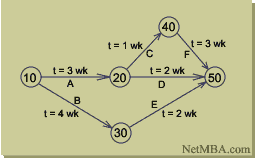
PERT stands for "Program Evaluation and Review Technique". It is a network model that allows for completion times of project activities to be somewhat random. It was developed in the late 1950's for the U.S. Navy, to provide project management. The PERT method can help reduce both time and cost required to complete a project.
The idea behind PERT is that activities to be accomplished are called "activities", and the dates marking the milestones of project completions are called "events". If these terms sound familiar, it's probably because they are much like UML State Diagrams, which in turn are almost exactly like a DFA. These diagram components are assembled into graphs like the one in the picture. The arcs of the graph are the project activities, and the nodes are the events. Before an activity can begin, all activities that are its predecessors must be finished. The graphic above (from the website link in the following paragraph) is a simple example. Most PERT charts have at least several pages of graphs like this one.
Here is a link to an MBA site that tells all about PERT charts; what they are, how to develop them, and what they can be useful for, as well as some of their drawbacks.
A GANTT Chart is another way of describing a schedule. It looks like this:

GANTT charts are named for their inventor, Henry Gantt. The chart is based on a graph using Cartesian coordinates, where the X axis is linear time and the Y axis is a listing of the tasks to be performed. Showing the schedule in this way makes it somewhat easier to visualize the duration of the subtasks in relationship to each other. Elapsed time durations for each task are shown as horizontal bars in the chart, one bar to each line (task) of the project. Milestones are shown as black diamonds. Frequently, the start point of the task is shown as a triangle, and the stop point is shown as an upside-down triangle (that's why the milestones look like diamonds; when you put the triangles on top of each other it becomes a diamond).
Here is a link to the same MBA site that tells all about GANTT charts.
Your task for this section is:
Make a schedule for your development tasks. Try to figure out how long you think it will take to do each of the tasks that comprise your project. Break up the tasks into sub-tasks if necessary, and then add up all the times for the sub-tasks to make sure the total duration isn't too long. Assign the sub-task results to the development team, and figure out where there may be some overlapping tasks. Then put the results of all this into either a PERT or GANTT chart and include it in your deliverable document. This will show the order and relationships between tasks, and will show the general flow of the semester as well as specific deadlines (milestones).
Interesting side note: When a task gets behind and management starts getting worried, one of the first things that happens is they make a new GANNT chart. The new chart may go through several iterations until management is satisfied that all the tasks are broken out to a sufficiently low level. Then there will be durations assigned to the tasks. A new cycle of iterative massaging is then performed. When the results are posted, the milestones are so close together that they can't really be called "mile"-stones any more. This is where the term "inch"-stones is derived. When a project has gotten into enough schedule trouble that the progress starts being measured in inchstones, it is a sign that extreme micro-managing is happening. This can be difficult, not only because you will begin spending a large amount of your (already precious) development time preparing and giving status reports, but also because the "new" schedules will be notoriously short, so there won't be enough time to perform your assigned tasks (even without the extra status reporting).Danger, Will Robinson!
Another thing that happens frequently in these situations is management will assign extra people to the project. WHY IS THIS BAD?
Task/Resource Table Section
The task/resource table will show the relationship between tasks and resources. In other words, for each task you will show the people, hardware and software that the task will need. This information helps provide proper resource "loading" so that no one person (or other resource) is critically over-burdened. The object is to make sure that all team members share the load as equally as possible. Listing everything you can think of in this section will help to ensure nothing is unaccounted for in the schedule, which keeps things as realistic as possible.
BTW, don't be afraid to "push back" if necessary, when the project manager is telling you that a task you know takes three weeks must be done in two.
Class Schedule Section (Optional)
This section will show a schedule of all class meetings and the activities that will occur during those meetings. These activities will include all of the oral presentations and any faculty lectures. Also include any outside responsibility such as room reservations, invitations, flyers, and refreshments for the final presentation.
Table of Contents
Entries in the project SDF table of contents should be generated for the Software Development Plan document. These entries should match the section titles listed above and in the table of contents at the bottom of the Course Overview page.