CMSI 185: Welcome to Week 12
This Week's Class Agenda
This week we will work on:
- Homework #3 due Thursday
- What is software engineering and software design?
- Object-Oriented program design
- Inheritance/encapsulation/information hiding
Software Engineering
Just what IS Software Engineering? Does software NEED to be engineered?
Is it even possible to "engineer" something that isn't even solid or the
kind of thing you can hold in your hand?
Actually, it is not only possible, but critical to the success of ANY non-trivial software project that the disciplined, methodical engineering approach of any other type of engineering be applied. Just consider, for example, what happens when those engineering principles are not followed, or are followed incorrectly — catastrophic failure could result, as in the case of the Tacoma Narrows Bridge. Here is a video which is pretty amazing…
It may seem that software failures might be less dramatic than this; after all, a BSOD is not as life-threatening as a bridge collapse. But what if that BSOD occurs in the computer that controls the flight navigation instruments of a 747 airliner? What if there was a software failure which was very slight, but which caused a small drift in the navigation heading? What if the plane were crossing the ocean when it happened, flying from LA to Hawaii? Here's the math: a 747 cruises at about 600 miles per hour for about 5 hours to get to Honolulu, for a total distance of about 3000 miles. An error of a mere 0.5 degrees, even if it didn't compound during the flight, would cause an error of about 26 miles off course at the destination. Admittedly that isn't far, but what if the flight was at night? Or in a storm? The plane might fly right by the islands and never know. And what if that 1/2 degree error was compounded so that the plane was flying in an arc instead of a straight line?

Here are some software "horror stories" which should convince you that software is, in fact, the "most difficult human activity there is", according to the Douglas Crockford video you have seen.
- The Mars Climate Orbiter crashed in September 1999 because of a "silly mistake": wrong units in a program.
- Several 1985-7 deaths of cancer patients were due to overdoses of radiation resulting from a race condition between concurrent tasks in the Therac-25 software.
- The Ariane 5 satellite launcher malfunction was caused by a faulty software exception routine resulting from a bad 64-bit floating point to 16-bit integer conversion.
- An Iraqi Scud missile hit Dhahran barracks, leaving 28 dead and 98 wounded. The incoming missile was not detected by the Patriot defenses, whose clock had drifted .36 seconds during the 4-day continuous siege, the error increasing with elapsed time since the system was turned on. This software flaw prevented real-time tracking.
- The clock in the video camera indicated a customer had withdrawn his money at the same time as a fraud occurred, so the bank forwarded his photo to the authorities. The clock had been off by about one hour.
- On July 1-2, 1991, computer-software collapses in telephone switching stations disrupted service in Washington DC, Pittsburgh, Los Angeles and San Francisco. Once again, seemingly minor maintenance problems had crippled the digital System 7. About twelve million people were affected in the crash of July 1, 1991.
- There was a San Francisco 911 system crash of over 30 minutes on Oct. 12, 1995. Patched but not fixed, it still misses between 100-200 calls per day.
- The Denver airport stayed closed for over a year due to software glitches in the automated baggage handling system.
- Chicago cat owners were billed $5 for unlicensed dachshunds. A database search on "DHC" (for dachshunds) found "domestic house cats" with shots but no license.
- Link to the page from where these stories were culled.
OOD and OOP
In the past weeks we've talked about "process-oriented" or "procedural" programming as well as "event-driven" programming. Now we will talk about another type, based on the idea of our old friend the Object, which is called (of course!) "Object-Oriented" programming, also called "OOP".
The basic difference between these programming styles is the focus of the programs. Process-oriented programming focuses on the program, or more specifically the algorithm that is needed to make the program solve the problem — the data were of secondary importance. However, with OOP, the data becomes the most important part of the programming, with the algorithmic parts treated as behaviors that operate on that data. The result is that the objects contain data and the functions that can operate on that data, all in one thing, a user-defined data type which we call an "Object", and hence the name "Object-Oriented" programming.
To go along with this concept, there is a matching software design method called (what else!) the Object-Oriented Design (OOD) method. There is even a system analysis method called OOA. OOP/OOD/OOA has been around for years, and is pretty much the way all modern programming is done. There is even a special standards group, the Object Modeling Group!
The first thing to realize about OOP is that it isn't totally focused on data; the data is important, yes, but it often can't really mean anything without the functions with which it can be manipulated. There are several reasons why objects become so powerful. First, they are user-defined, so the data matches what the user needs to do with the data. With a weakly-typed, dynamically bound language like JavaScript, this attribute takes on even more meaning, since the programmer can define objects which can be changed dynamically as the program execution progresses and needs may change. Second, these user-defined data structures can comprise other objects, making aggregation of objects into other object possible, for increased power and facility of the program. Finally, the functions that operate on the data are also included as definitions in the object itself, so that the data can be operated on in a standard way, which reduces not only errors in programming but also the potential for errors during program execution. We have discussed this somewhat already, in the idea of exceptions, error handling, and input parameter checking. Several of you have included these error concepts in your homework!
Remember, though, that when you define an object, you are defining an entire class of them; the definition must be used before it can actually do anything in the program. This is similar to our idea of defining a function — when you define it, it's like the car in the driveway, just sitting there. It's there, but it doesn't do anything until you get in and turn the key (call the function). In the case of objects, this usage is referred to as creating an "instance" of the object, a process known as "instantiation". Here's an example from your text book to help:
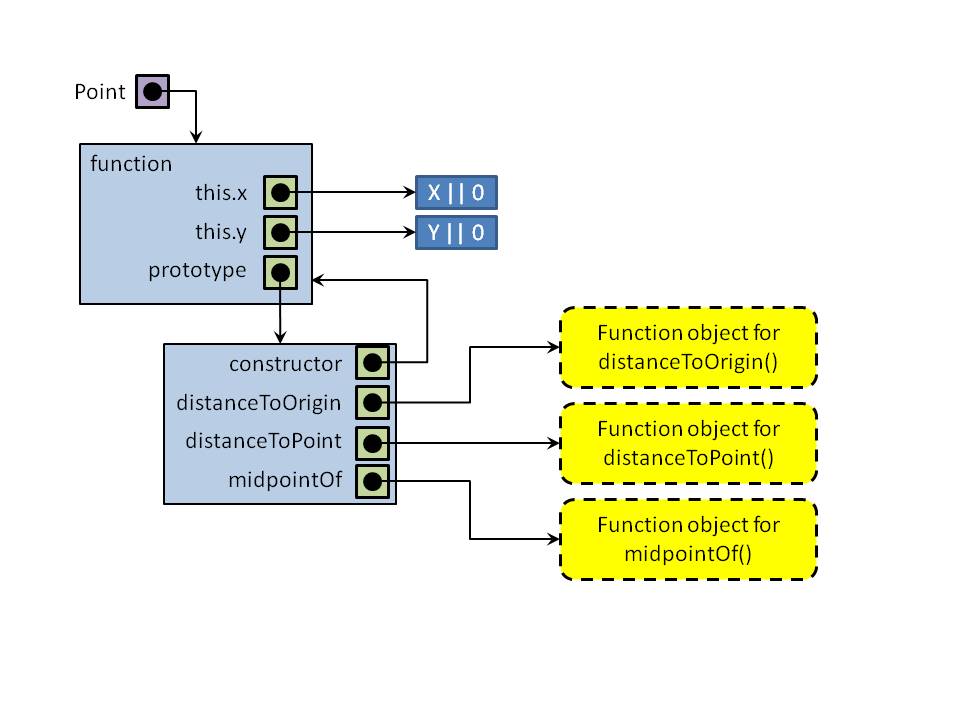
Here is the (slightly modified) code from the book that matches the diagram:
      // Here's the Object definitions
      var Point = function( x, y ) {
         this.x = x || 0;
         this.y = y || 0;
      };

      Point.prototype.distanceToOrigin = function() {
         return Math.sqrt( (this.x * this.x) + (this.y * this.y) );
      };

      Point.prototype.distanceToPoint = function( p ) {
         var deltaX = p.x - this.x;
         var deltaY = p.y - this.y;
         return Math.sqrt( (deltaX * deltaX) + (deltaY * deltaY) );
      };

      Point.prototype.midpointOf = function( p ) {
         return new Point( (this.x + p.x) / 2, (this.y + p.y) / 2 );
      }

      // Here's some instantiations
      var p1 = new Point( -4, 1 );
      var p2 = new Point( 1.5, 3 );
      var p3 = new Point( 4, -2 );
      var mid1 = p3.midpointOf( p2 );
      var mid2 = p2.midpointOf( p3 );
      alert( "Point p1 distance to origin is: " + p1.distanceToOrigin() );
      alert( "Point p2 distance to Point p1 : " + p2.distanceToPoint( p1 ) );
      alert( "Midpoint between p2 and p3 is : (" + mid1.x + ", " + mid1.y + ")" );
      alert( "Check consistency of midpoint : (" + mid2.x + ", " + mid2.y + ")" );
Inheritance and Encapsulation
There are still two other mechanisms that are part of any truly OO language. We have touched on them in class previously, but we will explore them now in more depth. These two pieces are called inheritance and encapsulation:
- Inheritance is defined as a mechanism that allows objects to be defined, and then those objects can be used as the basis for defining other objects.
- Encapsulation, also known as "information hiding", isolates the data in an object from the outside world, and protects it from being interfered with by other parts of the system.
The idea of inheritance is that the programmer can define what she needs as a base class or base object, and can then produce further more specific versions of that object which will automatically include all the parts of the base object, but can then be extended to include new and different data types. The base object is known in OOP terms as the "superclass", and the derived objects are known as "subclass objects" or simply "subclasses". Of course, subclasses can also have subclasses, which themselves can have subclasses, etc. We've discussed in class about a "car" object, which could be subclassed to include a Porsche or a Toyota. All cars have four wheels, a motor, and some type of seat. A Toyota would also have a backseat and front wheel drive, while a Porsche would not. But a Porsche would most likely have a traction stabilizer bar and high-speed rated tires that my little Tercel wouldn't have.
The text book has another example, on page 281, which shows inheritance in the animal kingdom. This is a useful comparison to make to show the point. Another one is the "shape" class, which makes use of the things all shapes have in common, then subclasses the shape base class into separate circle, triangle, square, rectangle, rhomboid, and trapezoid classes. All of these examples are "classic" computer science examples of inheritance.
Encapsulation, on the other hand, has a slightly different focus. While inheritance is designed to allow derived classes to share information, the encapsulation mechanism is intended to prevent access to an object's data. The idea here is to protect the data so that the system as a whole stays in a reliably stable state. Imagine what would happen if an object had some critical resource that was programmed to keep the airbag from deploying, and some other system software component was able to change the parameters for that deployment. In this type of situation, the values that are kept in the airbag object should only be allowed to be changed by notifying the object that a change is being requested, giving the object itself control over whether that change would be allowed. The decision would probably be based on other methods within that airbag object such as sensor inputs, such that the integrity of the airbag safety system is protected.
The mechanism for performing encapsulation in JavaScript relies on our old friend the "scope" mechanism. Remember that when a variable or a function is defined inside a block of code, that they are only visible within that block of code. To the outside world, they are invisible, since they are "out of scope" for the rest of the program. What this allows is, we can define a function (constructor) for an object, including its data properties and the functions needed to access those data properties, and everything will only be visible within the function. For any object which is outside of that object, the only way to access the data properties are to use any functions which are provided for that purpose; otherwise, the variables are effectively invisible. The variables within the inner scope are visible to the functions within that same inner scope (the advantage of closures, remember those?), but not to the outside world!
Java, C#, and several other languages implement this mechanism by using keywords such as "public" or "private" or even "protected" but JavaScript doesn't use those. It is useful to know that other languages provide similar functionality, though. It is also useful to read about the "property descriptors" on pages 289 — 292 of your text book, to see how this mechanism can be extended and custom-tailored to provide complete control of the mechanism.
In-class Coding Problems for YOU!
This problem will be divided into five parts. Each part will be attacked by a team. At the end, all the parts will be integrated together to make the complete system. You may team up however you wish; if there are too few teams, I'll make some assignments.
The purpose of this exercise is to give you a chance to use some of the knowledge you have gotten of programming during the semester. You will be doing a little bit of everything we have learned in the last eleven weeks, and designing a non-trivial applicaiton. You will also learn what it is like to work as a member of a team of software developers.
Remember that all input is valuable. Don't be afraid to speak up and suggest something, even if you feel it's "off the wall". Remember that thinking outside the box can be a benefit to the entire team!
Here is the problem statement:
The department of public works for a large city has decided to develop a web-based Pot Hole Tracking and Repair System (PHTRS). A description follows:
Citizens can log onto a Web site and report the location and severity of potholes. As potholes are reported they are logged within a "public works department repair system" and are assigned an identifying number, stored by street address, size (on a scale of 1 to 10), location (middle, curb, &c.), district (determined from street address), and repair priority (determined from the size of the pothole). Work order data are associated with each pothole and include pothole location and size, repair crew identifying number, number of people on a crew, equipment assigned, hours applied to repair, hole status (work in progress, repaired, temporary repair, not repaired), amount of filler material used, and cost of repair (computed from hours applied, number of people, material, and equipment used). Finally, a damage file is created to hold information about reported damage due to the pothole and includes the citizen's name, address, phone number, type of damage, dollar amount of damage. PHTRS is a web-based system; all queries are to be made interactively.
The groups will be as follows:
- Group 1: Design the pothole object for the reporting system.
- Group 2: Design the work order data object.
- Group 3: Design the citizen object for the reporting system.
- Group 4: Design an algorithm to assign priority to pot holes.
- Group 5: Design the repair tracking object.
- Group 6: Design the web-based report form for citizens to use to report pot holes.
- Group 7: Design the algorithm to compute the repair cost of a pothole.
Coming Up Next…
Next week, we'll continue with more about software engineering, including the Mythical Man Month, software requirements, software design, algorithm design, and several other interesting topics. We'll see how to modularize code and how to take advantage of JavaScript built-in artifacts.