CMSI 185: Welcome to Week 05
This Week's Class Agenda
REMEMBER: Your Exam #1 is Thursday!!
Structural Elements
This week will cover something very important in programming, which is being able to branch into two (or more) different paths of computation based on a decision. Decisions are one of the last two fundamental programming concepts we will cover, the other being loops. We'll end the week on Thursday with the first quiz. Topics we'll cover include:
- Declarations and Expressions and Statements — Oh MY!
- Input and output from users and other places
- Conditionals — if statements and decisions
- Conditional expressions
- Switch statements
- Short circuits
- Finish on Thursday with Test/Quiz #1
Statements and Expressions
To start off, there are two kinds of "sentences" in JavaScript (or just about any other modern high-level programming language), namely statements and expressions. The first of these is the kind of thing that produces an action in the script. Statements perform the following tasks in our programs:
- Variable declaration and initialization
- Calling operations, such as the built-in JavaScript functions
alert()andprompt() - Assigning or re-assigning a value to a variable
- Checking the logical condition of something and performing operations based on the result
- Doing a (set of) task(s) repeatedly while some logical condition exists
Here is an example script which is annotated so you can see what type fits in each item above:
      var knights = ["Arthur", "Gawain", "Lancelot", "Robin"];    // Type #1
      var name;
      var quest;                                                  // Type #1
      var killer;
      for( var i = 0; i < knights.length; i++ ) {                 // Type #5
         name = prompt( "What is your name?" );                   // Types #1, #2, and #3
         quest = prompt( "What is your quest?" );                 // Types #1, #2, and #3
         killer = prompt( "What is the velocity of an unladen swallow?" );
         if( killer === "I don't know that" ) {                   // Type #4
            alert( "AAAAAHHHHHH!!!!!");
         } else if(killer === "What do you mean?") {
            alert( "I don't know that....  AAAAAHHHHHHH!!!!!" );
         } else {
            alert( "Right, off ya go, then......" );
         }
      }
Several things become apparent here. First, you can use a statement to declare a variable, like the "knights" array of strings, and initialize it at the same time. Second, you can declare a variable and NOT initialize it. Third, you can assign a value to a variable over and over, since the values of variables are not fixed (that's why they are called variables...). Fourth, you can call a function in a statement and immediately use its result as part of the statement; this is a VERY handy action. Fifth, you can see that an IF statement can have several parts to check several different conditions.
BTW, I hope at least some of you have seen "Monty Python and the Holy Grail" so that this silly program makes some sense to you....
By way of comparison, an "expression" gets evaluated to produce some sort of a returned value. An example of and expression follows:
      var other = "other";
      var than = "than";
      var that = "that";
      var both = other + " " + than + " " + that;
      alert( "both = " + both );
In this example, we see the result of the plus operator, which performs the action of sticking the strings together. The fourth line of the script calls the plus operator four times:
- it sticks a space on the end of the string contained in variable "other"
- it sticks the value of variable "than" onto the end of the string from #1
- it sticks another space on the end of the string from #2
- it sticks the value of variable "that" onto the end of the string from #3
This operation is an expression, and performs an operation called "string contatenation". The plus operator can also perform the action of normal numeric addition. The JavaScript interpreter can tell the difference by the data types of the values passed to the expression. If the data types are all strings, concatenation is performed. If they are numbers, addition is performed. This is called "overloading" in Object-Oriented programming terms.
Can you guess what happens if the data types are mixed up? Try this out and see what happens, then see if you can explain why:
      var tryme = " one way ";
      var numone = 1;
      var output = tryme + 1;
      alert( output );
      output = numone + tryme;
      alert( output );
Input and Output
We've actually already seen some basic examples of input and output in the previous section, and
in the previous weeks as well. However, there are some cool things that you can do with the
alert() and prompt() functions which you can use in your programs. For one
thing, since the prompt function returns a string, and strings are objects, you can immediately use
the returned string to call any of the string functions without having to assign to a variable. For
example, consider the following:
alert( prompt( "enter any string of numbers separated by spaces:" ).split( " " ) );
What do you think will happen with this code?
alert( prompt( "enter numbers" ).split( " " ).pop() );
The really interesting part of input is how you can do it from a web page. That's a little advanced for right now, so we'll defer that until after the first quiz, but in a nutshell you can use the JavaScript <input> entity in web pages to get input from the user right on the page. This input can have several different forms, as we'll see.
Output, up to now, has been done using the alert() JavaScript built-in function, which
works great for simple stuff. However, if you want to output a series of things, with alert you need
to put them all into one big output string, or you need to click the OK button a million times. We
need a better way to output things, and that's where the "document.write" function comes
into play.
Surprise! All web pages are objects. The web page that contains any JavaScript can be referred to
by the object called "document". Further, the document object has several cool
functions that are built-in, one of which is the write() function. Copy and paste the
following script into the script runner and see
what happens:
      for( var i = 0; i < 10; i ++ ) {
         document.write( "I = " + i + "<br/>" );
      }
We'll see a LOT more of this a bit later in the semester.
Conditionals: IF Statement
When we write programs, we need a way to cause the program's execution to make decisions. Based on
those decisions, one of possibly several things might need to occur. Remember the algorithm we saw
for Russian Peasant Multiplication? In step 6 the algorithm said "If B is odd then Total :=
Total + A". This is an example of a basic IF statement, which takes the form of:
IF <something-logical-is-true> THEN perform some statement(s).
There is
another form of the IF statement which is known as the "IF-THEN-ELSE" statement, which
takes the form:
IF <some-logical-is-true> THEN do some statement(s), ELSE do
            some other statments
.
The last version of this statement allows for multiple logical
conditions:
IF <some-logical-is-true> THEN do some statement(s),

                  ELSE IF <some-other-logical-is-true> THEN do some statement(s),

                  ELSE IF (zero or more of these condition check blocks can occur),

                  ELSE IF <some-other-logical-is-true> THEN do some statement(s),

                  ELSE do some statement(s)
Here is a UML activity diagram that shows the flow (copied from your text book on page 105) which is concerned with the grading scheme for this course.
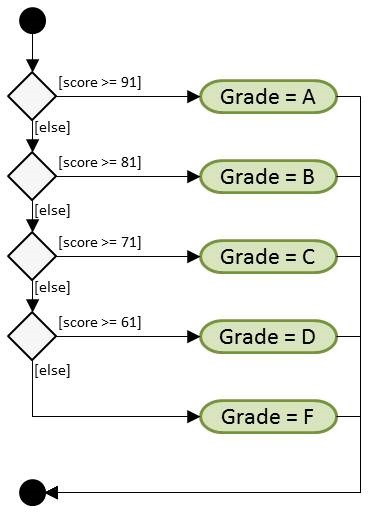
See if you can work out, in the script runner, an implementation of something similar, such as the
prices for a meal given various dishes, or interest rates given how much is in a savings account.
Then think about other uses for this construct. Which things need only the IF
statement? Which scenarios require the IF .. THEN model? When do you need to use the
full magilla of IF .. ELSE-IF .. ELSE to have the proper implementation?
Conditional Expression
This is actually a pretty simple statement, which is a condensed version of the IF block described above. In the event there are only two conditions, the conditional can take the form of a three-part check. This form of conditional is an espression, not a statement, because when it is evaluated it returns something which can be used immediately. The syntax uses a question mark and a colon to perform the checks, as follows:
      var check = true;
      alert( check ? "true" : "false" );
It's almost like the expression is asking the question "Is this true? If so do the first thing (which appears before the colon), if not, do the second thing (the part after the colon)". There are some examples in your textboook which show ways to handle, for example, making plurality match in an output statement. That is, you don't want to say "one cents", because the plurality of one should match "cent". You can use the conditional expression to make this happen, as shown in the following example:
      var amount = prompt( "Input the number of cents:" );
      alert( "You entered " + amount + ((amount == 1) ? " cent" : " cents") );
Notice in the alert() statement, if the amount entered is "1", the output is
"cent" and it is "cents" otherwise. There are a number of ways to do this, of
course, but when we are programming, it is nice to be able to use a smaller amount of code when we
can, to speed up the program's execution. Remember, in general, snappy program response means your
users will be happy with the program's operation!
Switch Statement
Another method of performing decision tasks, which is similar conceptually to the IF
statement, is the SWITCH statement. This type of decision compares some input value to
a series of cases to determine what action(s) to take. Unlike the IF statement
the SWITCH statement only compares for equality (as if using the "triple equal"
for the logical comparison). However, if there are a large number of cases, this method can save a
lot of coding space.
There are two additional things that should be mentioned with the switch:
- There should be a "default" case which, if none of the cases is matched, provides a specific (set of) action(s) to perform; frequently this can be in the form of some error message or error handling function call.
- Within each case section (or "block"), it is usual to see a "break" statement which causes the processing to jump out of that case and thence out of the switch. NOT providing a break will cause an action known as "fall-through" which means that if a case is matched near the top of the switch, it will execute the actions for that case, and then proceed to execute the actions for all cases below it.
Sometimes fall-through is desired. For example, if you always pay your staff the same base salary, but then augment that salary with different hierarchical amounts for different conditions (like a commission), a switch statement with fall-through might be a good implementation. In this case, the base salary would be the default, and each level would get the base salary and all the additional values which appear between their commission level and the default as well. Here's some code to show what I mean:
      var level = prompt( "Input your level (1 - 3):" );
      var amount = 123.45;
      switch( level ) {
         case "3" : amount *= 1.1;
         case "2" : amount *= 1.1;
         case "1" : amount *= 1.1;
         default  : amount *= 1.0;
      }
      alert( "You've made " + amount + " dollars this week." );
If you look in your text book on page 109, you'll see another UML activity diagram. This one is of a switch statement. Notice how much it looks like the diagram for the IF statement on page 105? It is because these two statements perform very similar functions. Sometimes it is more parsimonious to implement a decision segment as a switch, if you are only concerned with equality of case matching. However, sometimes a switch statement won't do, especially if you are checking inequality as well as equality in the logical comparisons; for this you'll need an IF statement.
Your text book presents one more method of performing decision actions, which is to use a table of values which is indexed by some condition. JavaScript is good at this, because the association between the index and the value can be specifically defined in the data, without using either of the previous methods mentioned here. Such a data structure is called a "dictionary" and has many uses in more advanced applications. Read pages 110 — 114 for the full explanation, including a nifty little application that can show you what letters are on the numbers of a telephone keypad.
Short Circuiting Logical Expressions
What happens if you have more than one condition that you need to check in the logical evaluation of
the IF statement? You can use the logical operators within the parentheses to perform
evaluations of more than one thing. For example, what if you want to know that some input value is
within a specified range? Here is an example:
      var input = prompt( "Input a number between 1 and 10:" );
      if( input < 1 || input > 10 ) {
         alert( "Out of range!" );
      } else {
         alert( "Thanks." );
      }
If the user enters something that is less than one or greater than ten, the script outputs a message that states the out of range condition. Otherwise, the script outputs a simple acknowledgement.
Now lets analyze what happens in the conditional. If the user enters, say, zero, the script will
check that input against the first condition and find that the input is less than one. Remember in
the truth tables we studied a few weeks ago, if either of the conditions of an
OR conditional are true, the result is TRUE. Thus, when the first condition of our
"input < 1" check is found to be true, there is no need to evaluate the second
expression to check if the input is greater than ten — it obviously is not. So the branch is
taken and the user is notified of the error on entry.
This scenario describes what is known as a "short circuit". If a part of a conditional is evaluated and the result of that evaluation can determine the result of the entire logical condition, there is no need to waste time performing the other evaluation(s) of the logical conditional. Doing so provides no further value.
Short circuits can get in the way, though, and cause unexpected processing results. This situation most often happens when the programmer forgets about the short circuiting, or gets the logic of the conditional wrong. For example, consider the following:
      if( expression1 || getInput() ) {
         alert( "Out of range!" );
      } else {
         alert( "Thanks." );
      }
If something should happen as a result of the execution of the function in the conditional, and the short circuit operation causes that function not to be executed because expression1 is true, the results could be unpredictable. The lesson here is to be aware of this artifact of logical evaluation, and double-check your logical evaluations.
Don't Forget...
Your first test is Thursday. The test will cover everything we have discussed up to now, including homework, in-class exercises, reading, videos, and so on. It will be closed book/closed note. You may NOT use a calculator, unless you want to use a slide rule. YOU MAY NOT consult with anyone else on any questions, either by IM, text, cell phone, or email. You will have the entire class period for the test. Please be on time so that you can have the full 1:30 period.