CMSI 185: Welcome to Week 03
This Week's Class Agenda
The Nuts and the Bolts…
This week we will continue experimentating with concepts of which you must have a firm grasp if you are to become an effective programmer and computer scientist. These topics are guaranteed to whet your programming interests with a taste of several different activities!
- Comments/Expected coding standards
- Binary/hex representations and conversions (important topic!)
- Truth tables and logical operations
- Operator precedence (another critical topic!)
- LOTS more examples to stress the fundamentals
- A few "war stories" from the trenches of software engineering
DON'T FORGET!: Your first homework assignment is due at the beginning of class on Thursday this week. If you haven't started it yet, you should probably get busy on it, IMHO. This is just a gentle reminder………
Coding Standards
Your textbook spends a little time with the idea of coding standards, particularly as they apply to commenting your code. As you get better with your programming skills, your programs will become more involved and it may become difficult to remember all the details (or to remember exactly, at any rate). You will need some sort of prompting to help you remember. Enter the comment.
Comments are lines of text in computer code that have a special designator to get the assembler, the compiler, or the interpreter to ignore them. This provides a convenient method for you to insert some reminders into your code. One of the best ways to do this is to put a "comment block" at the top of a source code file which states pertinent information; that way, whenever you open the file (or when anyone else does, either) a summary of what that file does is right there on the display. Of course, comments can be sprinkled throughout the remainder of the file as well, but having them at the top is often helpful.
Many programmers will state that comments are unnecessary, and that if you can read the code you can understand what it does. This is true to a large degree; however, there are a couple of points which can also be made: 1) comments help the reader understand more easily what the code is doing; and 2) comments document things for folks who come along later to maintain the code.
(Insert war story here.)
An additional topic to comments is coding standards. The structure of the programs, and the consistency of capitalization, indentation, and formatting not only help make the code look "professional" but also help the reader to understand the code without having to forcefully ignore the style. One other thought about this topic occurs when a project is large enough to need multiple programmers; in this case, adhering to a standard makes everyone's job easier, makes code reviews go faster, and produces a more coherent product overall.
As we saw in week one, there is a handy tool for checking your JavaScript source code for inconsistency as well as for syntax errors: JSLint. Also, there is a JavaScript style guide available at this link. Another example is at this location. We will, of course, experiment with these in class.
Number Representations
Next up on the weekly agenda is the idea of how computers represent things in memory. You may have wondered, "How does the computer, which only knows ones and zeros, know how to do addition? How can it represent text? How does it know the difference between an integer and a real number?" …or maybe you haven't, but these are still pertinent questions to understand as a programmer and computer scientist.
Everything inside the computer is in binary. Every bit (a contraction of "binary digit") can only indicate on or off. This means that if it were only bits, we could only represent two numbers, zero and one. However, by grouping the bits into "bytes", we can use the base-2 number system to represent nearly any number we can think of.
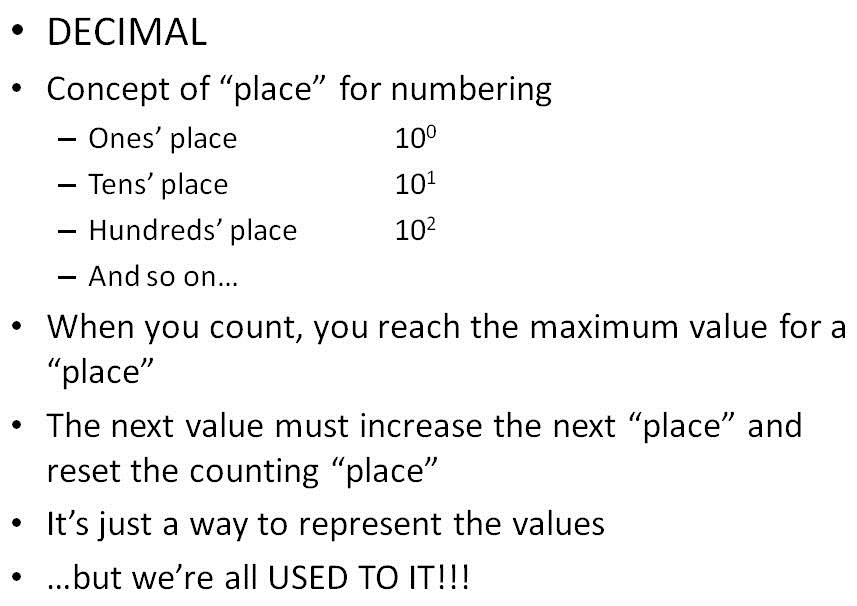
Let's start with what is meant by "base-2" number system. Remember in our normal system of
decimal, which is base-10, there are ten digits, zero through nine; also, when you write a number that
has several digits, each digit holds a base-10 value for that place. As an example, the number
192 means one hundred, nine tens, and two ones. Here is a brief explanation:
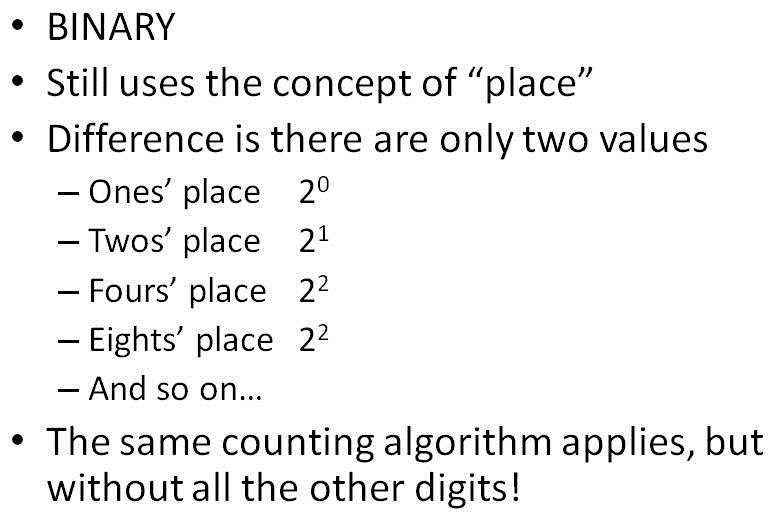
The same thing can be done with base-2, only instead of ten digits there are only two. We'll cover this in class as a demonstration. Here's another brief explanation, followed by a diagram to link all this together for you:
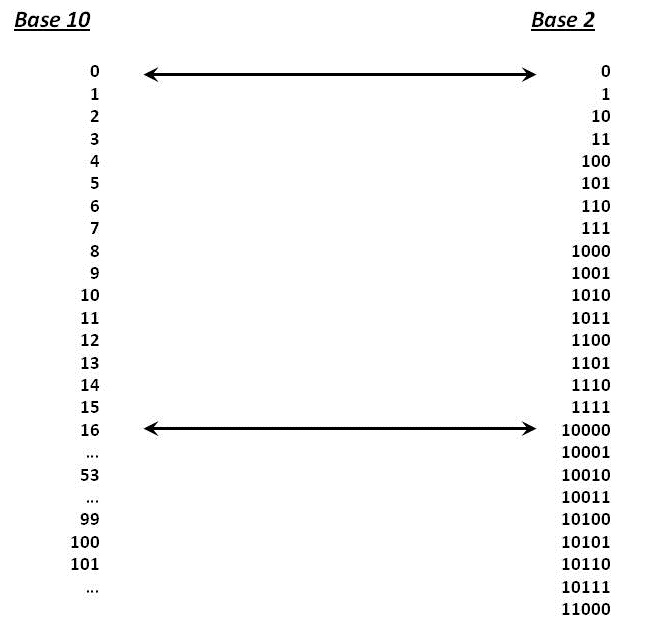
The bottom line is, because of this base-2 system, we can represent any integer in the range 0-255 with a set of eight bits. These eight-bit groups, sometimes referred to as "octets" are more commonly known as bytes.
Computers handle storage in groups of bytes, and commonly use the international decimal system's prefixes to name them. For example, one Kilobyte is 1000 bytes, because "Kilo" means thousand. One Megabyte is one million bytes, one Gigabyte is one billion bytes, one Terabyte is one trillion bytes, and so on.
It's really hard to read the values for numbers in binary. For example, what is the value represented
by 01101001? It is much more pleasant to look at number values in the manner to which we
are accustomed, such as 105. But it is well-known that if you are a programmer, you need
to know and understand the binary (base-2) system, so an easy method of converting is needed, and we
have just such a tool: "double-dabble". We'll see this in class, too.
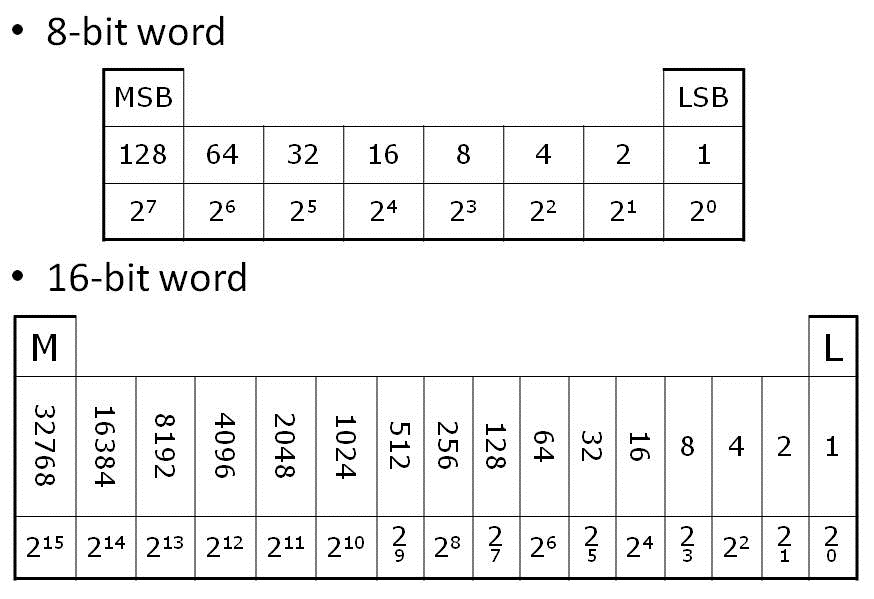
For numbers larger than 255, we extend the concept to add more bytes to the group. Two bytes, or 16 bits, can represent up to the value 65535. And four bytes, or 32 bits, can represent up to the value 4,294,967,295. such groupings of bytes into larger sets are referred to as "words", and here is a picture of how that might be visualized:
OBTW, the method of representing countable collections of things using numbers is an abstraction which is (similar to) a way of representing something with something else. We'll learn more about abstractions later.
Character Representations
Now that we know how computers represent numbers in memory, it's time to ask the question, "What is the difference, to the computer, between a number and a character?" A further question to ponder is, "How do characters get displayed on the screen?" Since the computer only knows how to handle ones and zeros, how do we represent characters?
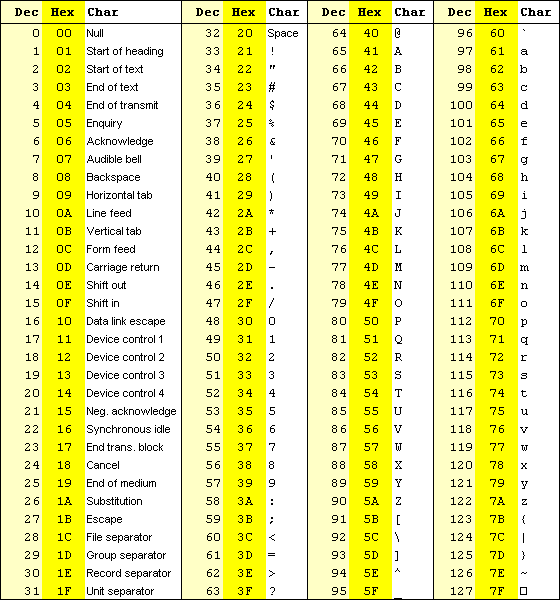
The answer to these questions is that the computer uses an abstraction which assigns a specific bit pattern to each character. The actual graphic that is displayed on the screen, called a glyph, has a specific set of dots or pixels that appear on the display, which are usually kept in a table. When you press a button on the keyboard, the key press activates circuitry which outputs a pattern of ones and zeros, which are then used as an index value into this table, and the pattern of pixels that should be displayed for that character is sent to the graphics card to be put up on the screen. The collections of index patterns are called by several names, the simplest being "ASCII" and the most common modern web set being "Unicode". Links to tables of the encoding for these two collections are given below:
The next question is, "How do we represent a sentence?" In JavaScript, as in most languages (including English, actually), a sentence is treated as a simple sequence of characters. In computer programming terminology, such a sequence is called a "string" and is one of JavaScript's data types that are built into the language. JavaScript is actually a bit nicer with strings that many other computer languages, in that strings are treated as objects, and thus have several nice behaviors which are also pre-defined for us. For example, the string "this is a string" can be treated as an object so you can do this:
      alert( "this is a string".substring(5,7) );    // alerts "is"
      alert( "hey-nonny-nonny and hot-cha-cha".substring(4,9).toUpperCase() );  // alerts "NONNY"
There are lots more built-in functions for strings which you should check out on your own. Your text also has some interesting hints to display glyphs in your code output by using "codepoints", which are numeric versions (in hexadecimal) of the table indices. Really do check these out, because they provide the utility to make lots of cool graphics!
LIKE THIS: ♛ ⚀ ⚂ ཛྷ
Pretzel Logic: The Truth Table
As mentioned previously, the Boolean functions are logical operations. They are usually thought of in terms of comparing two things using some sort of conditional. Boolean results (outputs) are either true or false, which equates in binary terms to one or zero (of course). One easy way to determine these results is using a truth table. Truth tables for the four main Boolean comparisons are provided below.
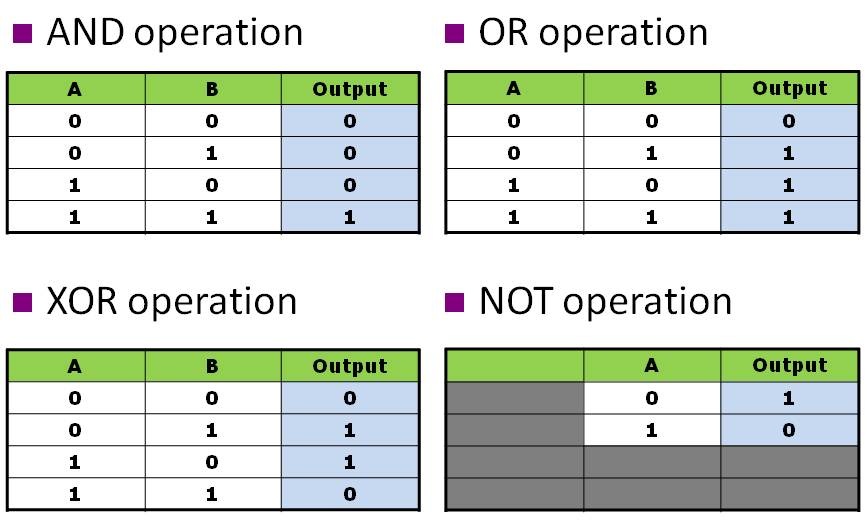
There are other ways of comparing things, which also produce a Boolean result. These comparisons are what you might expect: greater-than, less-than, equal-to, and combinations like greater-than-or-equal-to. You can also combine these with the four logical Booleans, giving NOT-greater-than-or-equal-to and so on.
We'll see more about these, and their usefulness, in the discussion of "conditionals".
Hexadecimal Notation
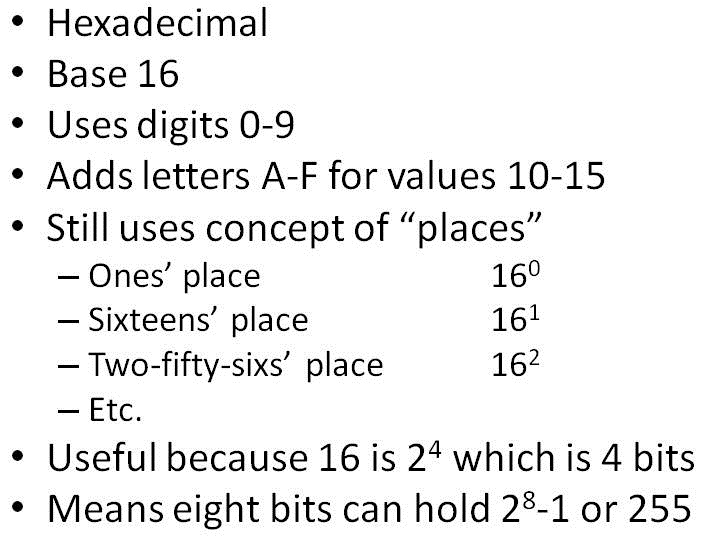
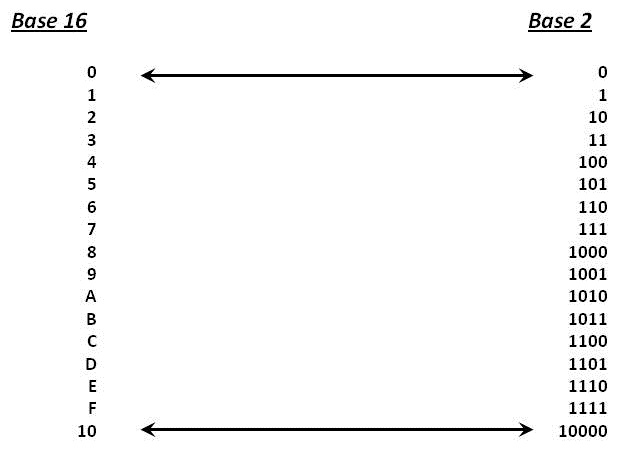
Another important topic with number bases is the use of numbers larger than ten as the base for the counting system. One such base is the number 16; the number system using this base is called the "hexidecimal system". Obviously, there are not enough numbers in the set of zero to nine to make it all the way to 16 in a single digit. To overcome this, we use the letters A through F to represent the values ten through fifteen. The following graphic summarizes:
Why would we want to do something as seemingly illogical as using numbers bigger than ten? It turns out that the values represented by every four binary bits can be represented by a single digit of the hexadecimal system. Here is (yet) another graphic to show you:
Note that you can actually do math operations like addition and subtraction (and others, too) on all these number systems, but as programmers, we prefer to let the computer do that stuff for us. But, don't be fooled — having a good understanding of these number representations and how they look in the machine's memory is one of the programming fundamentals which you will need in order to become an effective programmer!
Operator Precedence
The last topic for this week is the critical one of operator precedence.
QUICK QUIZ: What is the resulting value of the following expression:
3 + 2 * 4 / 2 - 1
Is it:
- 9
- 20
- 11
- 6
- none of the above
All computer programming languages have what is known as an operator precedence which specifies the ordering of all such computations. The example above contains only mathematical operators (in what is known as "infix" notation, BTW) for which the age-old adage Please Excuse My Dear Aunt Sally still applies. However, operator precedence for computer languages includes ALL operators, including equality and inequality, logicals, and so forth. There is a table on page 33 of your textbook which shows the full set for JavaScript, from highest precedence to lowest precedence. Highest precedence operations are performed first in any computation.
The best way to ensure that your computation proceeds as you expect is to use parentheses to group the operations together. Since parentheses essentially have the highest precedence, they are used by JavaScript to force (or exactly specify) which operations to perform in which order.
For example, writing var x = 5 - 2 - 4; in your code will assign the value -1
to variable X because of operator precedence, but you can force the answer to be 7
by adding parentheses to make var x = (5 - (2 - 4)); which means the inner parentheses are
evaluated first.
Now, taking the precedence into account, can you figure out the result of the initial computation? Hint: Don't forget Aunt Sally!